Lead capture
B2B Website Lead Capture Best Practices for Demo, Pricing, and Contact Pages
Use page-specific forms, routing, and handoff checks so high-intent B2B visitors get the right next step instead of falling into one generic inbox.
On this page
The quick answer
The best B2B lead capture setup starts by matching the page to the buyer's intent: demo pages prepare a conversation, pricing pages help buyers confirm commercial fit, and contact pages route the request to the right owner.
What is this visitor trying to learn or finish on this page?
Which fields improve route, preparation, response, or buyer experience?
What happens after the buyer submits the request?
Who receives the request and what context do they need?
If a field does not change the route, response, preparation, or buyer experience, remove it or ask it later.
Lead capture is a handoff, not a form
Many B2B teams treat lead capture as a form-length problem: shorter forms versus longer forms, more fields versus fewer fields, chat versus no chat. Those choices matter, but they are not the whole system.
- The page promise makes the visitor willing to act.
- The form or CTA captures the request.
- The thank-you state sets the expectation after submission.
- The routing rule sends the request to the right owner.
- The follow-up context helps sales, support, or success respond usefully.
- The review loop tells marketing whether the page attracted the right demand.
When that handoff is weak, the page can look like it is "converting" while the team still receives vague, slow, or poor-fit requests.
Match capture to the page intent
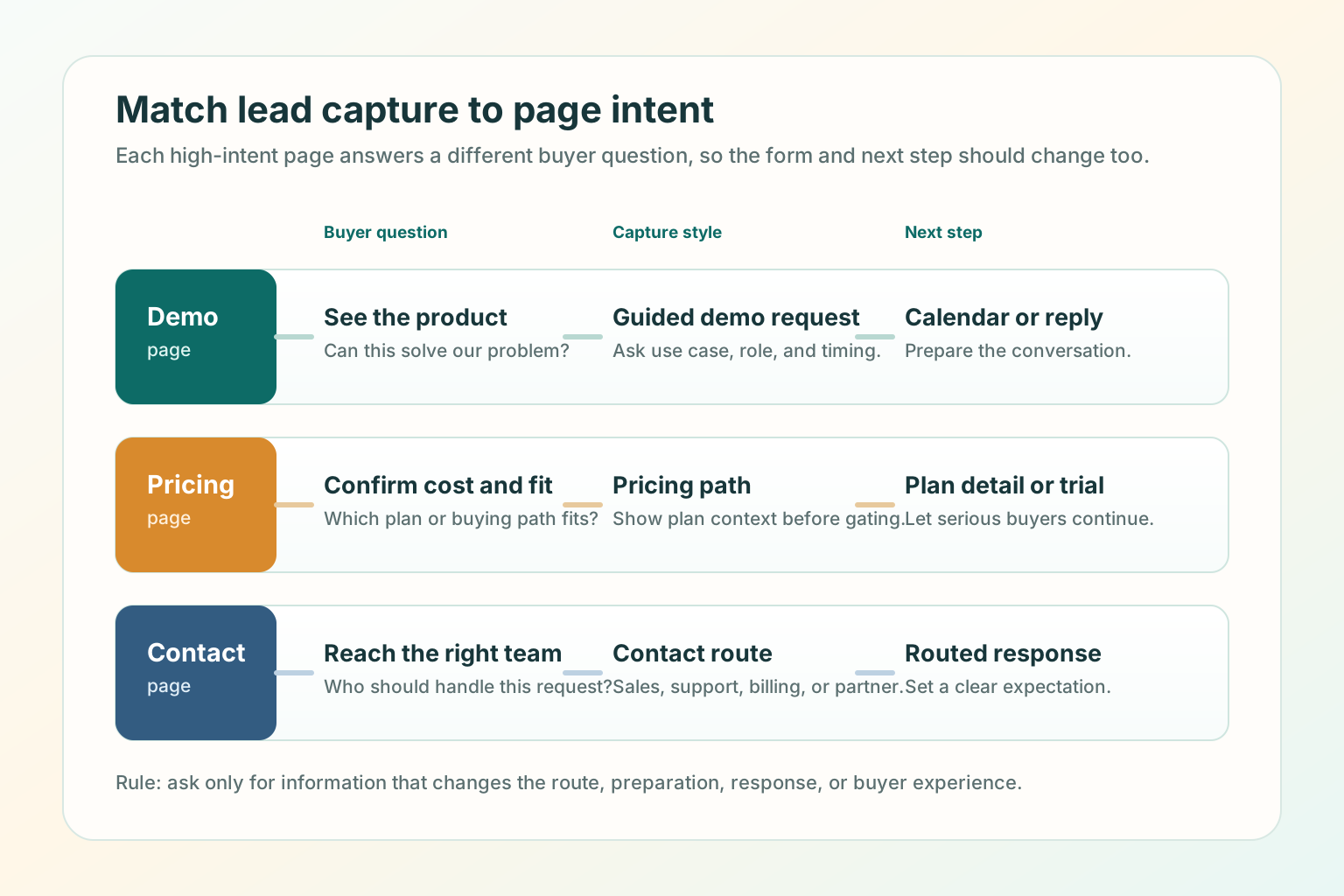
Demo, pricing, and contact pages often sit close together in the navigation, but they do different jobs. The wrong capture style creates friction at the moment when the visitor is closest to action.
Use a guided demo request with role, use case, company fit, and timing context.
Use a pricing path with plan context, self-serve option, or sales-assisted route.
Use clear routing choices for sales, support, billing, partnership, or general contact.
Demo page best practices
A demo page should help a qualified buyer imagine the conversation before they book it. Qualify enough to prepare the conversation, not enough to interrogate the buyer.
- Ask for work email, name, company or website, role or team, primary use case, and a light timing signal.
- Keep the primary demo form to 4 to 6 fields.
- Put "what happens next" next to the form, not only on the thank-you page.
- Show who the demo is best for so poor-fit visitors can self-select out.
- Include one softer path for visitors who are not ready.
- Confirm whether the next step is calendar booking, manual reply, or a qualification call.
The demo page should not make a qualified buyer wonder whether they will get a product walkthrough, a sales pitch, a pricing call, or a generic inbox response.
Pricing page best practices
A pricing page captures lead intent differently because the visitor is comparing cost, packaging, and fit. Make the page useful before asking for contact details.
Plan names, core differences, billing period, and who each path is for.
What happens when a buyer needs more than the public plan.
Quote, annual billing, pricing walkthrough, trial, or self-serve checkout.
If pricing is not public, avoid pretending the page is a pricing page. Say what the buyer can learn there: packaging factors, typical buying motion, implementation scope, or how to request a quote.
Contact page best practices
A B2B contact page is the safety net for sales questions, support issues, billing requests, partnerships, press notes, and confused visitors who could not find the right route. That page needs routing clarity.
- Sales or demo request.
- Support or installation help.
- Billing or account question.
- Partnership or integration inquiry.
- General message.
What can we help with?
- Sales or demo
- Support or installation
- Billing or account
- Partnership
- Something else
The goal is not to make the contact page complex. The goal is to avoid forcing every visitor through the same blank box.
What to ask in a B2B lead form
A form field should earn its place.
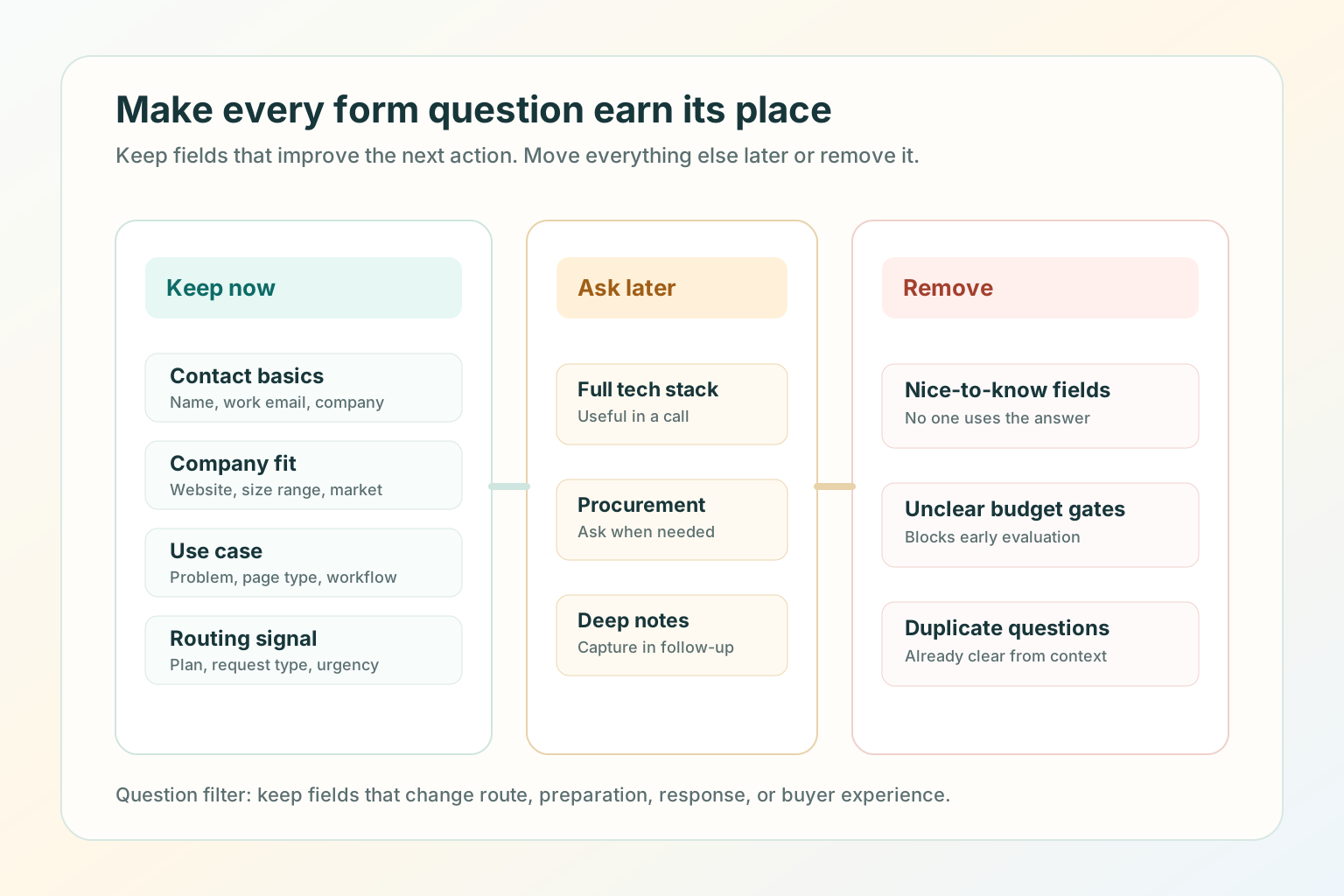
Keep fields that change the next action
- Contact basics: name, work email, and company.
- Company fit: company website, size range, or market when it affects routing.
- Use case: the problem, page type, workflow, or team goal.
- Routing signal: plan interest, request type, region, or urgency when it changes the owner.
Move or remove the rest
- Detailed budget, full tech stack, procurement process, and long implementation notes can often wait.
- Nice-to-know fields, unclear budget gates, duplicated fields, and required blank message boxes should be removed.
Build the handoff lane
The form is only the start. Qualified demand still needs a clear handoff.
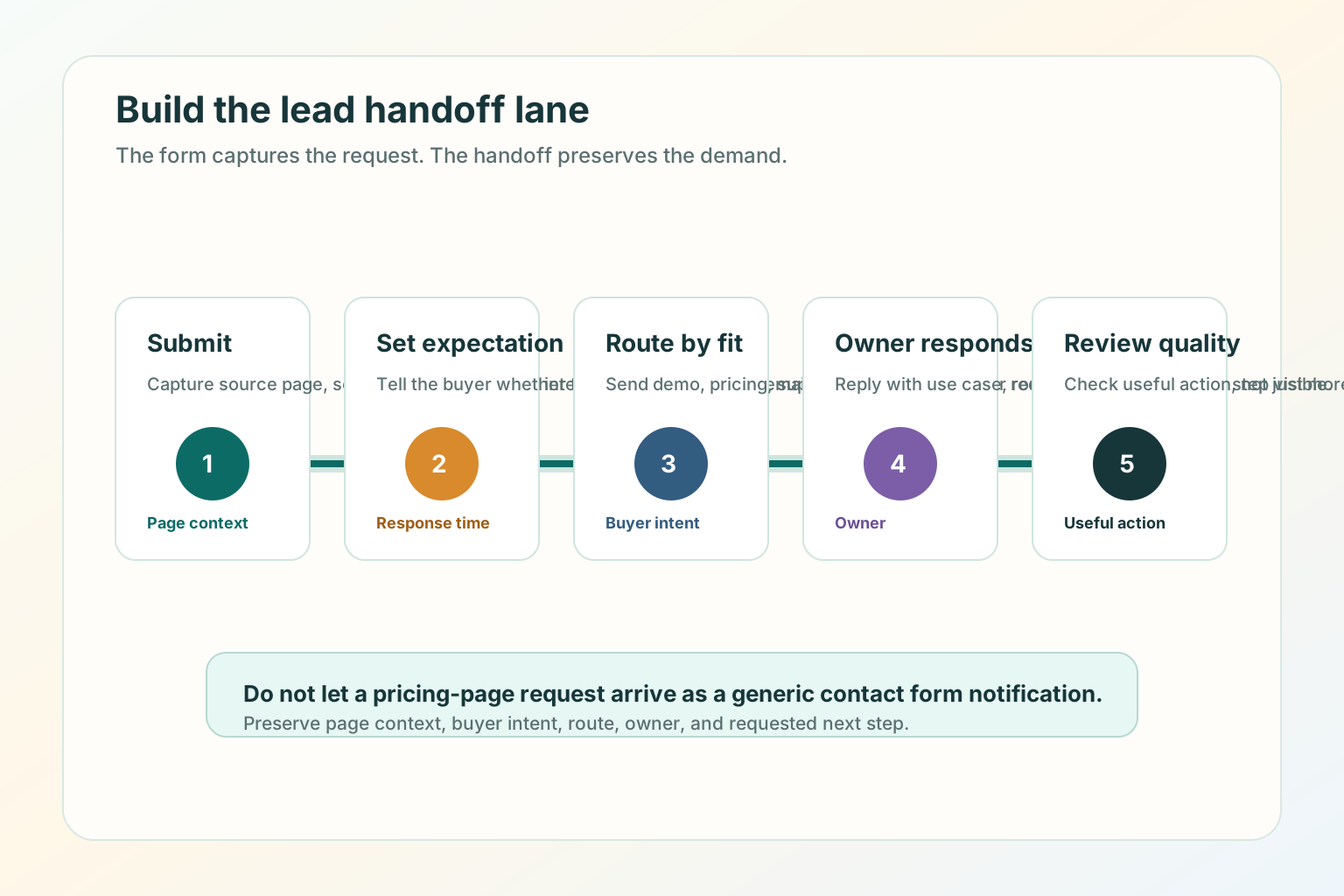
- Submit: capture the request, source page, and selected path.
- Set expectation: confirm what happens next and whether the buyer should book, wait, or check email.
- Route by fit: send demo, pricing, support, billing, and partnership requests to the right owner.
- Owner responds: reply with page context, use case, and requested next step visible.
- Review quality: check whether the page is producing useful action, not just more submissions.
Good use versus poor use
Good use
- Matching each high-intent page to one buyer question.
- Asking only for fields that improve routing, preparation, or response.
- Showing what happens after the visitor submits.
- Giving pricing-page visitors enough context to choose the right commercial path.
- Reviewing lead quality by page, not only by total form submissions.
Poor use
- Using the same long form on every high-intent page.
- Hiding basic pricing, plan, or next-step context behind a required demo request.
- Asking qualification questions that do not change the next action.
- Sending every request to the same owner without page context.
- Measuring success only by submission count.
SEO and AEO checks for lead capture pages
SEO and AEO for lead capture pages are mostly clarity and crawlability work. Google's helpful content guidance says content should be made for people first, and its link guidance emphasizes crawlable links with useful anchor text.
- Put the page's main answer in HTML text, not only in a form, modal, video, or image.
- Use a descriptive title and H1 that match the page's real job.
- Keep demo, pricing, and contact pages internally linked with normal
<a href>links. - Add structured data only when it describes visible page content.
- Keep metadata, headings, sitemap entries, and agent-readable Markdown aligned.
- Use alt text that explains what each visual teaches.
- Add a direct answer near the top so a search engine, assistant, or human can summarize the page without guessing.
Sources used for the SEO/AEO review: Google people-first content guidance, Google link best practices, and Google breadcrumb structured data guidance.
Test before you ship
- Open the page on desktop and mobile.
- Say the buyer question out loud within 10 seconds.
- Check whether the CTA and form match that question.
- Remove any field that does not change route, preparation, or response.
- Submit a test request for each route.
- Confirm the thank-you state says what happens next.
- Confirm the owner receives the source page, selected path, and buyer context.
- Check the page title, meta description, canonical URL, internal links, image alt text, structured data, sitemap entry, and Markdown alternate.
- Review lead quality after a small traffic window before adding another capture layer.
Where TitleFlash fits
TitleFlash does not replace a clear demo, pricing, or contact page. It supports the return path after the page already makes sense.
If a buyer opens a demo page, pricing page, or contact form and then switches tabs, a short inactive-tab title can help them notice the unfinished task again. Use it for calm reminders such as "Still comparing?", "Demo details here", "Pricing page open", or "Need help deciding?"
Add a respectful return path after lead capture clarity is working.
The exported TitleFlash script is self-contained. It does not call TitleFlash after installation, does not load a TitleFlash CDN, and does not send visitor analytics back to TitleFlash at runtime.
Build a tab-title flow free