CTA copy and placement
Website CTA Best Practices: What to Say and Where to Put It
Write calls to action that say what happens next, appear at the right decision point, and give distracted visitors a respectful path back when they leave the page open.
On this page
The quick answer
The best website CTAs are specific, honest, and placed at decision points. A CTA should match the visitor's intent on that page, not reuse the same generic button everywhere.
Use one primary CTA after category, outcome, and audience are clear.
Add CTAs after proof, comparison, pricing, feature, or FAQ sections.
Help visitors who need examples, pricing, or more context before acting.
Good CTA copy is usually 2 to 6 words when the surrounding text explains the context. If the button needs 10 words to make sense, the section around it probably needs clearer copy.
Why CTAs fail
Weak CTAs usually fail because the copy is vague, the promise is unclear, the page asks too early, or the destination does not match the button text.
"Submit," "Learn more," and "Get started" do not always explain the next step.
The visitor cannot tell whether the click starts checkout, a demo, a download, or a sales request.
The page asks for action before explaining enough value, proof, or fit.
The destination does not match what the CTA promised.
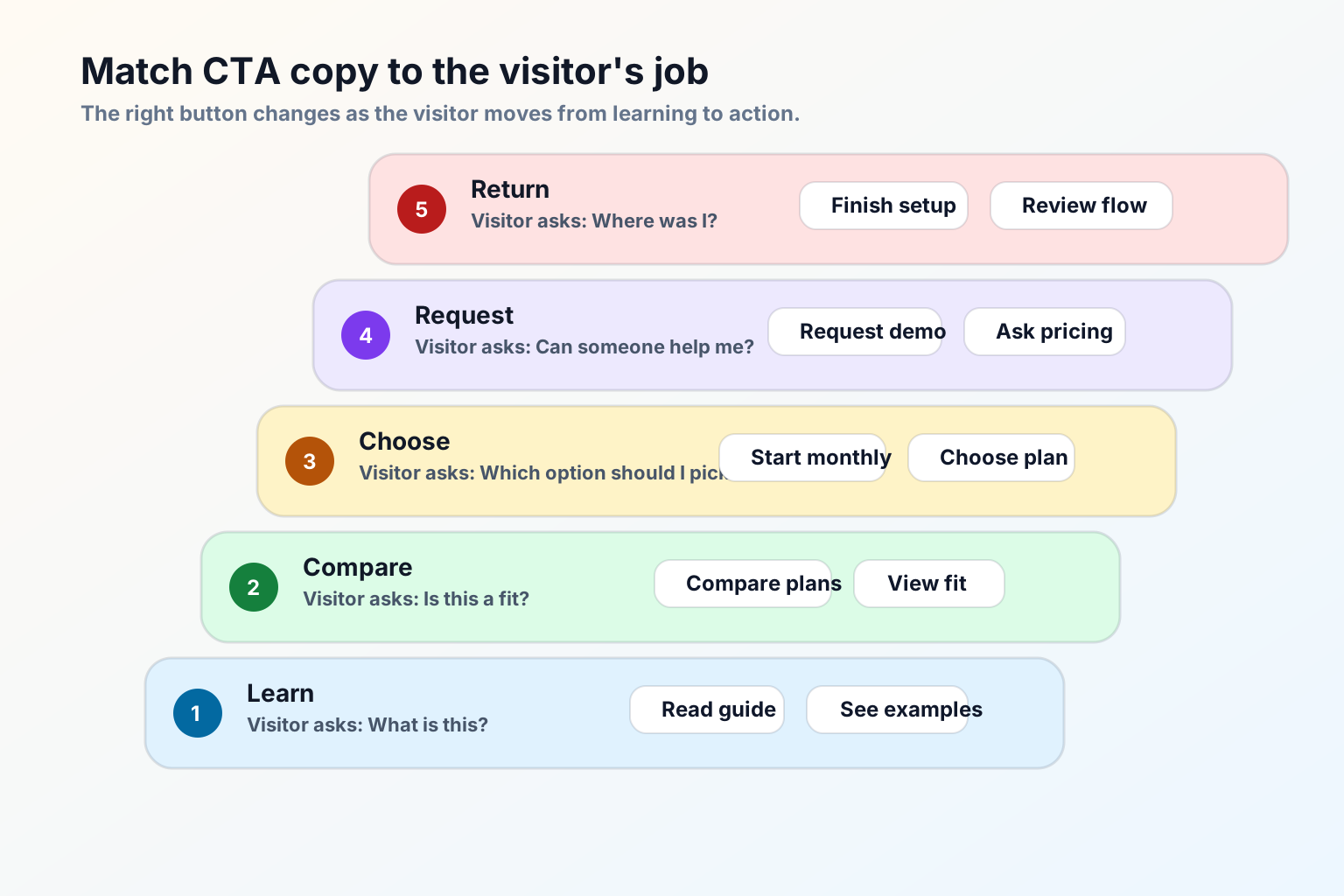
Match CTA copy to page intent
CTA copy should change based on what the visitor is trying to do. The best CTA is not always the most aggressive CTA. It is the one that matches the trust, context, and readiness the page has already earned.
Use outcome-first CTA copy
Good CTA copy tells the visitor what they get next. If you use "Get started," support it with nearby text that explains what starts: free account, checkout, demo request, builder preview, guide download, or quote request.
Better patterns
- "Compare plans" instead of "Learn more" on a pricing page.
- "Build a tab-title flow" instead of "Get started" on a product page.
- "See ecommerce examples" instead of "Explore" on a use-case page.
- "Request a pricing walkthrough" instead of "Submit" on an enterprise pricing form.
- "Continue setup" instead of "Go" inside an app or install flow.
Weak patterns
- "Submit" when the visitor is sending a high-intent request.
- "Click here" when the destination should be obvious.
- "Get started" on every button, even when each section has a different job.
- "Book now" before the page explains what the meeting includes.
- "Download" without naming the asset.
Where to put CTAs on a website page
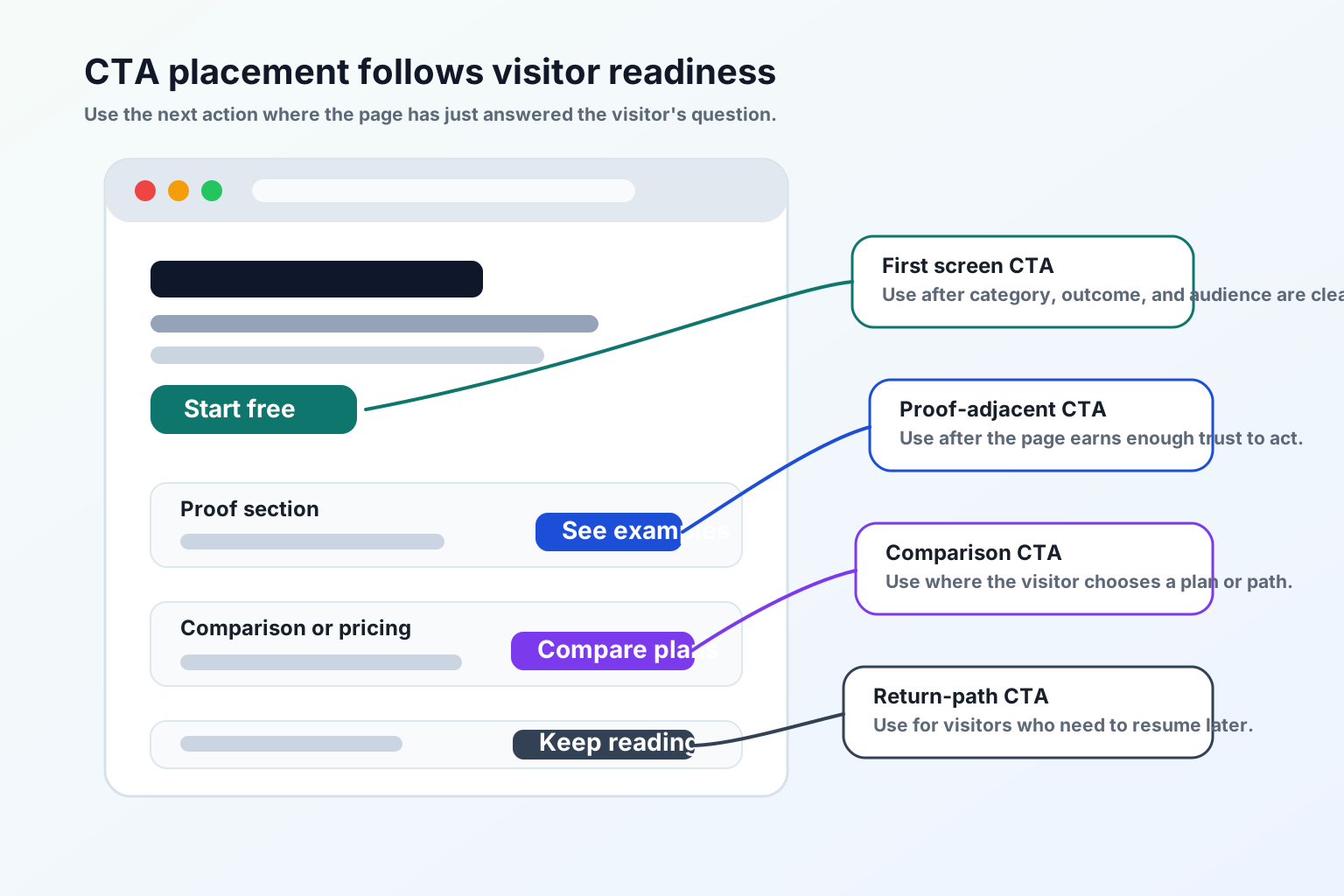
CTA placement should follow the reader's decision path. Use CTA placement to reduce effort, not to shout.
- First screen: one primary CTA after the headline explains category, outcome, and audience.
- Proof section: a CTA after testimonials, logos, case examples, or trust details.
- Feature or benefit section: a CTA after the visitor understands the specific value.
- Comparison section: a CTA after the page answers "why this instead of that?"
- Pricing section: a CTA next to the plan, quote path, or billing choice it belongs to.
- Form section: a CTA that says exactly what happens after submission.
- End of page: a final CTA after objections, FAQ, and risk reducers.
Do not place the same CTA after every short block of text. Repetition can make the page feel desperate.
Primary and secondary CTAs
Most important pages need one primary CTA and one softer path. The secondary CTA should not compete visually with the primary action.
Secondary: See examples.
Secondary: Compare plans.
Secondary: Ask about annual billing.
Secondary: Open install guide.
CTA examples by page type
Homepage CTAs
Pricing page CTAs
Demo and contact CTAs
Content and guide CTAs
Good use versus poor use
Good use
- Matching CTA copy to the page's real job.
- Putting the primary CTA where the visitor has enough context to act.
- Using secondary CTAs for visitors who need examples, pricing, or proof.
- Making the post-click destination match the button promise.
- Testing CTAs on mobile, not only desktop.
- Giving return visitors a calm way to resume an unfinished task.
Poor use
- Reusing the same CTA copy on every page.
- Making every button visually primary.
- Asking for a demo before explaining what the product does.
- Sending "Compare plans" to a generic contact form.
- Measuring CTA success only by clicks instead of qualified next steps.
- Adding popups or flashing buttons to compensate for unclear page copy.
SEO and AEO checks for website CTAs
Search engines and AI assistants need visible, crawlable page content to understand what a page offers. CTA copy can support that when it is aligned with the page's heading, internal links, and destination.
- Put the page's main answer and next step in HTML text, not only in an image, modal, or script-rendered control.
- Use descriptive internal links such as "Compare pricing plans" instead of "Click here."
- Make the H1, meta description, and primary CTA describe the same page job.
- Add breadcrumb structured data when the page sits inside a guide or resource hierarchy.
- Make image alt text explain what the visual teaches.
- Keep the Markdown version aligned with the HTML article so agents can consume the guide without running JavaScript.
Sources used for the SEO/AEO review: Google people-first content guidance, Google link best practices, and Google breadcrumb structured data guidance.
Test before you ship
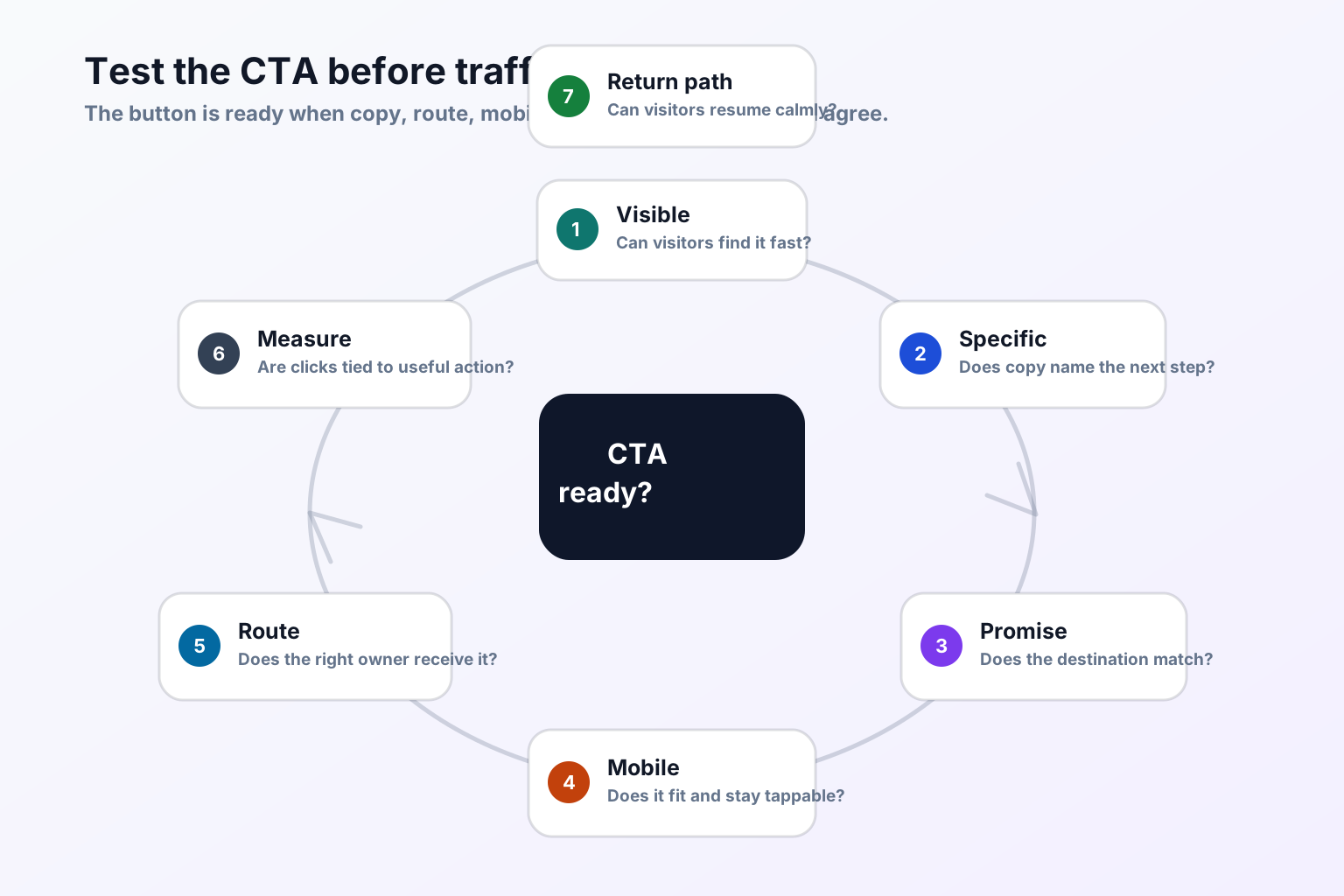
- Open the page on desktop and mobile.
- Read only the headline, first paragraph, and first CTA.
- Say what the visitor gets after clicking.
- Click the CTA and confirm the destination matches the promise.
- Submit a test form if the CTA opens a form.
- Check that the thank-you state or next page sets the right expectation.
- Confirm tracking or analytics identifies the CTA without collecting unnecessary personal data.
- Switch tabs for 10 to 20 seconds and return to see whether the page state is preserved.
- Review clicks and qualified next steps after a small traffic window before changing the CTA again.
If the CTA gets more clicks but fewer useful next steps, the copy may be overpromising or routing the wrong visitors.
Where TitleFlash fits
TitleFlash does not replace clear CTA copy or page structure. It supports the return path after the visitor has already shown interest.
If someone opens a pricing page, demo page, cart, setup flow, or guide and then switches tabs, a short inactive-tab title can help them notice the unfinished task again. Good reminders are calm and specific: "Still comparing?", "Pricing page open", "Finish setup", "Cart waiting", or "Keep reading."
Add a respectful return path after CTA clarity is working.
The exported TitleFlash script is self-contained. It does not call TitleFlash after installation, does not load a TitleFlash CDN, and does not send visitor analytics back to TitleFlash at runtime.
Build a tab-title flow free