Bounce rate
How to Reduce Bounce Rate Without Adding More Popups
Diagnose traffic fit, first-screen clarity, page friction, and next-step design before you ask visitors for more attention.
On this page
The quick answer
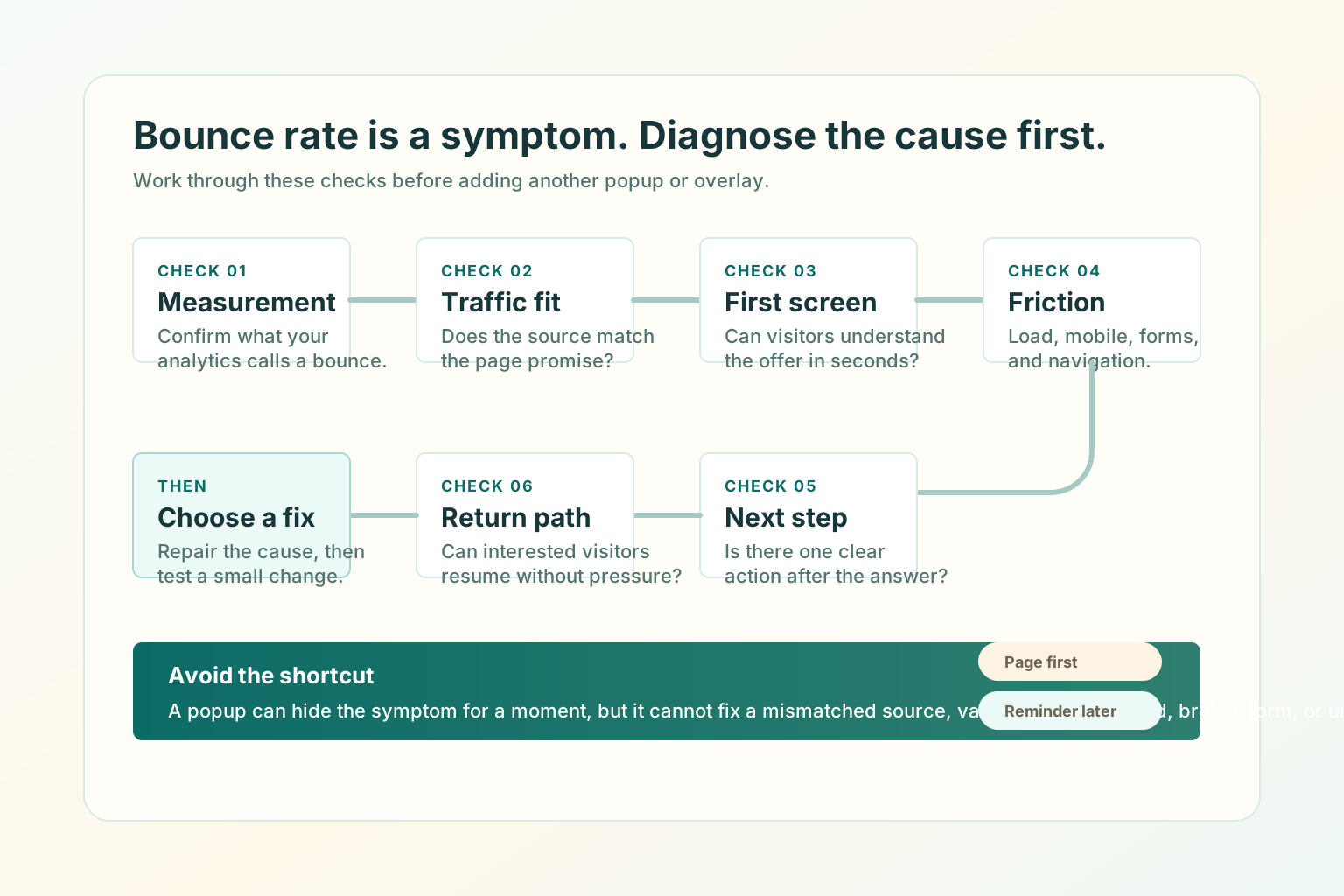
To reduce bounce rate without adding more popups, check measurement, traffic fit, first-screen clarity, page friction, next-step design, and return paths in that order.
Confirm how your analytics tool defines a bounce.
Compare the source promise with the page headline.
Make the right visitor understand the offer in 5 seconds.
Remove load, mobile, navigation, and form friction.
Give one next step that matches visitor intent.
Add a calm return path only when the page is useful.
Start with one high-value page and one traffic source. Review the page, make one clear fix, and compare engagement on the same traffic route before changing another variable.
What bounce rate actually means
Before you fix bounce rate, confirm what your report is measuring. In Google Analytics 4, bounce rate is the opposite of engagement rate. Google defines an engaged session as a session that lasts longer than 10 seconds, has a key event, or has 2 or more page or screen views.
That means bounce rate is not simply "someone saw one page and left" in every setup. A visitor may read a short page, get the answer, and leave without being a bad visitor. Another visitor may stay longer because they are confused.
Use bounce rate as a question.
- Did the visitor find the right page?
- Did the page answer the promise quickly?
- Did the page offer a relevant next step?
- Did friction stop the visitor before they could act?
- Did the page need to be a one-page answer?
Diagnose the cause before choosing the fix
Most bounce-rate fixes fail because they start with the tactic instead of the cause. If the traffic is wrong, page polish will not save it. If the first screen is unclear, a popup will not make it clearer.
Confirm engaged-session rules and key events.
Rewrite the ad, post, internal link, or landing page headline.
Clarify category, outcome, audience, proof, and CTA.
Improve load, mobile layout, navigation, and form behavior.
Add a specific CTA, related guide, pricing path, or checkout continuation.
Add a respectful reminder or saved-state cue after the page works.
Check traffic fit first
A bounce can be a page problem, but it can also be a source problem. If one source has weak engagement and the others are healthy, do not redesign the whole page. Fix the source-to-page match first.
- Search visitors: does the page answer the query directly?
- Paid traffic: does the ad promise match the headline and offer?
- Social traffic: does the page continue the same claim, example, or point of view?
- Partner traffic: does the page preserve the borrowed trust and context?
- Returning visitors: does the page help them resume what they already started?
For more detail, read How to Attract the Right Visitors to Your Website.
Fix the first screen
The first screen has to earn the next scroll. It does not need to explain everything, but it must make the page feel immediately relevant.
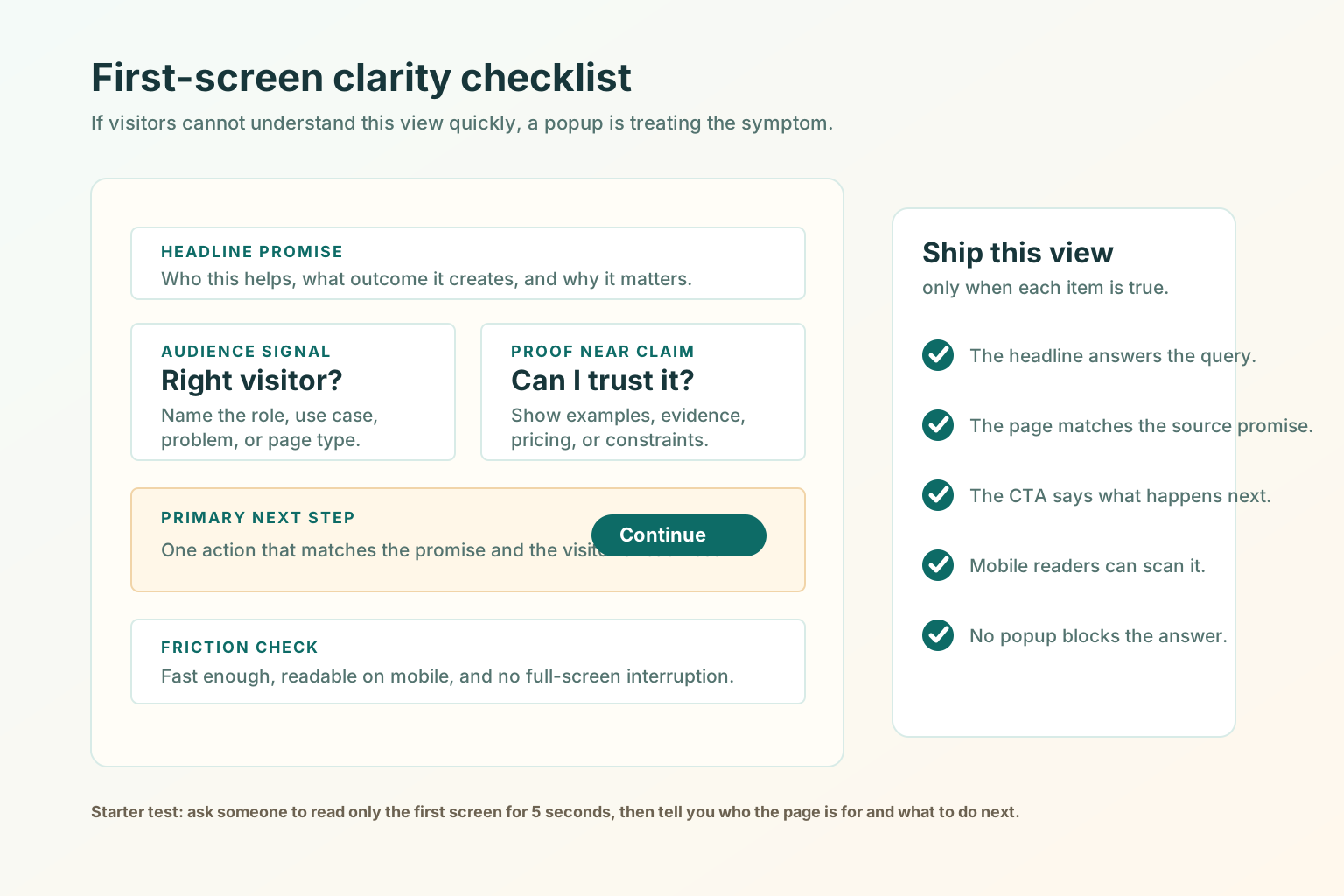
- The headline names the category, problem, or outcome plainly.
- The first paragraph explains who the page is for.
- The visitor can tell what they will get next if they continue.
- The primary CTA says what happens after the click.
- Proof appears near the claim it supports.
- The page is readable on a real phone without pinching, closing an overlay, or hunting for navigation.
- The first screen is not blocked by a newsletter popup, discount modal, chat takeover, or cookie prompt bigger than it needs to be.
Reduce load, mobile, and form friction
Some bounces are caused by friction the team stopped noticing. Google's page experience guidance is broader than a single score: content access, mobile display, speed, distractions, and whether the main content is easy to distinguish all matter.
The visitor should not stare at a blank or jumping first screen.
Buttons, links, headings, and forms should work on a real phone.
Do not pile banners, chat, cookie notices, and forms above the answer.
Improve the next step
Many pages answer the first question and then let the visitor fall off the edge. Good next steps are specific.
Give the visitor a path after the category and promise are clear.
Route commercial intent instead of hiding everything behind one form.
Respect the reader's current job before asking for a sale.
Explain whether the next step is a calendar, reply, or qualification call.
For CTA details, read Website CTA Best Practices: What to Say and Where to Put It.
When a return path helps
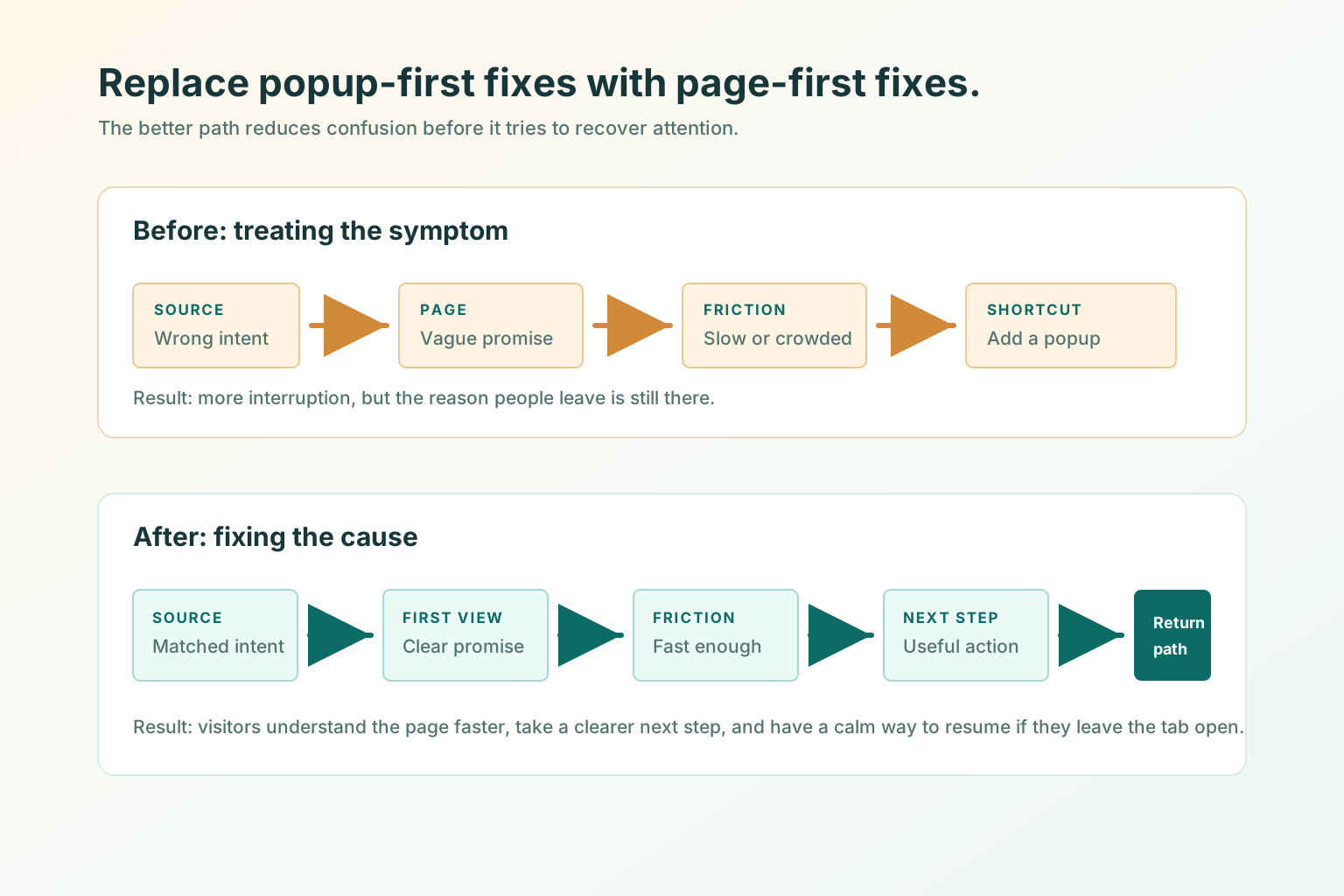
A return path helps when the visitor has already shown interest but gets distracted. The rule is simple: fix the page first, then add a reminder that helps the visitor resume.
Good return-path moments
- A visitor opens a pricing page and switches tabs.
- A shopper leaves a cart or checkout page open.
- A reader pauses halfway through a practical guide.
- A user starts setup but needs to check another tab.
- A buyer opens a demo form and leaves before submitting.
Poor return-path moments
- The visitor landed on the wrong page.
- The page is slow or broken.
- The first screen does not explain the offer.
- The CTA is vague.
- The page uses a popup to compensate for unclear content.
Good use versus poor use
Good use
- Segmenting bounce rate by source, page, and device.
- Matching the page headline to the source promise.
- Making the first screen clear before adding conversion tactics.
- Reducing friction in load, mobile, navigation, and forms.
- Giving each page one relevant next step.
- Using a calm return reminder for unfinished high-intent moments.
Poor use
- Treating bounce rate as a standalone success metric.
- Adding a popup before diagnosing the cause.
- Blocking the main content before the visitor can read it.
- Sending broad traffic to a narrow page.
- Measuring only lower bounce rate while qualified actions get worse.
- Using aggressive title messages, flashing UI, or urgency copy to force attention.
SEO and AEO checks for bounce-rate fixes
Search engines and AI assistants need accessible, visible page content. Bounce-rate fixes should make that content easier to understand, not harder to reach.
- Put the direct answer near the top in crawlable HTML text.
- Make the title, H1, meta description, and first paragraph describe the same page job.
- Use descriptive internal links with real
hrefattributes. - Avoid intrusive interstitials that block the main content unless they are legally required.
- Add image alt text that explains what each visual teaches.
- Keep structured data aligned with visible content.
- Keep the Markdown alternate aligned with the HTML page so agents can read the article without JavaScript.
Sources used for the SEO/AEO review: Google Analytics bounce rate guidance, Google intrusive interstitial guidance, Google people-first content guidance, Google page experience guidance, and Google link best practices.
Test before you ship
- Pick one page with meaningful traffic.
- Pick one source or segment to review.
- Record bounce rate, engagement rate, next-step starts, form starts, qualified submissions, or checkout starts.
- Make one page-first fix: headline, first paragraph, proof placement, CTA, speed, mobile layout, or form friction.
- Keep popups, chat prompts, and new reminders unchanged during the first test.
- Compare the same source and device mix after a small traffic window.
- Keep the fix only if engagement quality improves, not only if bounce rate drops.
Where TitleFlash fits
TitleFlash is not a bounce-rate analytics tool, popup builder, or hosted customer-site runtime. It should not be used to cover for unclear pages, wrong traffic, slow load, or broken forms.
It fits after the page already makes sense. If someone opens a pricing page, guide, cart, setup flow, or demo form and then switches tabs, a short inactive-tab title can help them notice the unfinished task again.
Fix the page first, then add a calmer return reminder.
The exported TitleFlash script is self-contained. It does not call TitleFlash after installation, does not load a TitleFlash CDN, and does not send visitor analytics back to TitleFlash at runtime.
Build a tab-title flow free