Qualified leads
How to Turn Website Visitors Into Qualified Leads
Build a clear route from visitor intent to qualified handoff with better criteria, capture, routing, and follow-up.
On this page
The quick answer
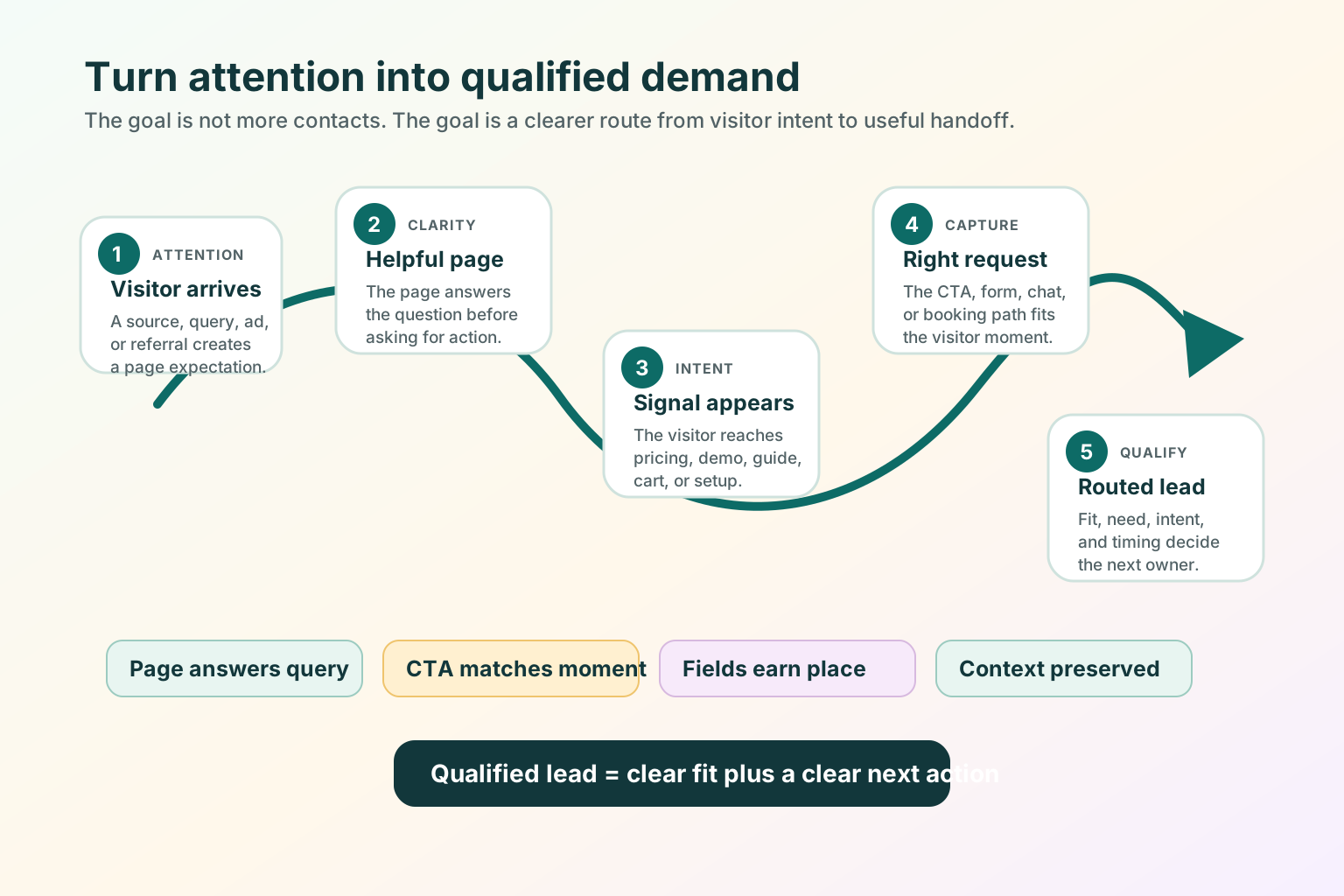
To turn website visitors into qualified leads, build a clear route from intent to handoff: define qualification, match the page to the visitor moment, ask only for useful context, route with that context, and measure quality after the handoff.
Decide what qualified means before changing a form or buying another tool.
Map each page to a visitor moment: learn, compare, choose, ask, or resume.
Use the CTA, form, chat, booking, trial, quote, or route that fits the moment.
Send the lead with context, then review quality after the response.
Start with one high-intent page such as pricing, demo, contact, product comparison, checkout, setup, or a deep guide. Fix that route before trying to optimize the whole site.
Capture is not the same as qualification
A captured lead is someone who gave you contact information. A qualified lead is someone your team can route, respond to, or help based on fit and intent.
Capture answers
"Can we contact this person?"
- Name, email, company, phone, or account.
- Consent, request type, or selected path.
- Enough detail to continue the conversation.
Qualification answers
"What should happen next, and who should own it?"
- Fit, problem, intent, and timing.
- Sales, support, billing, nurture, or not-fit route.
- Context that makes the response useful.
Define qualified intent for your business
Do not copy another company's qualification rules without checking your own buying motion. For a self-serve product, qualification may start when someone reaches a setup limit. For a sales-led B2B product, it may start when a target account asks for a demo with a real use case.
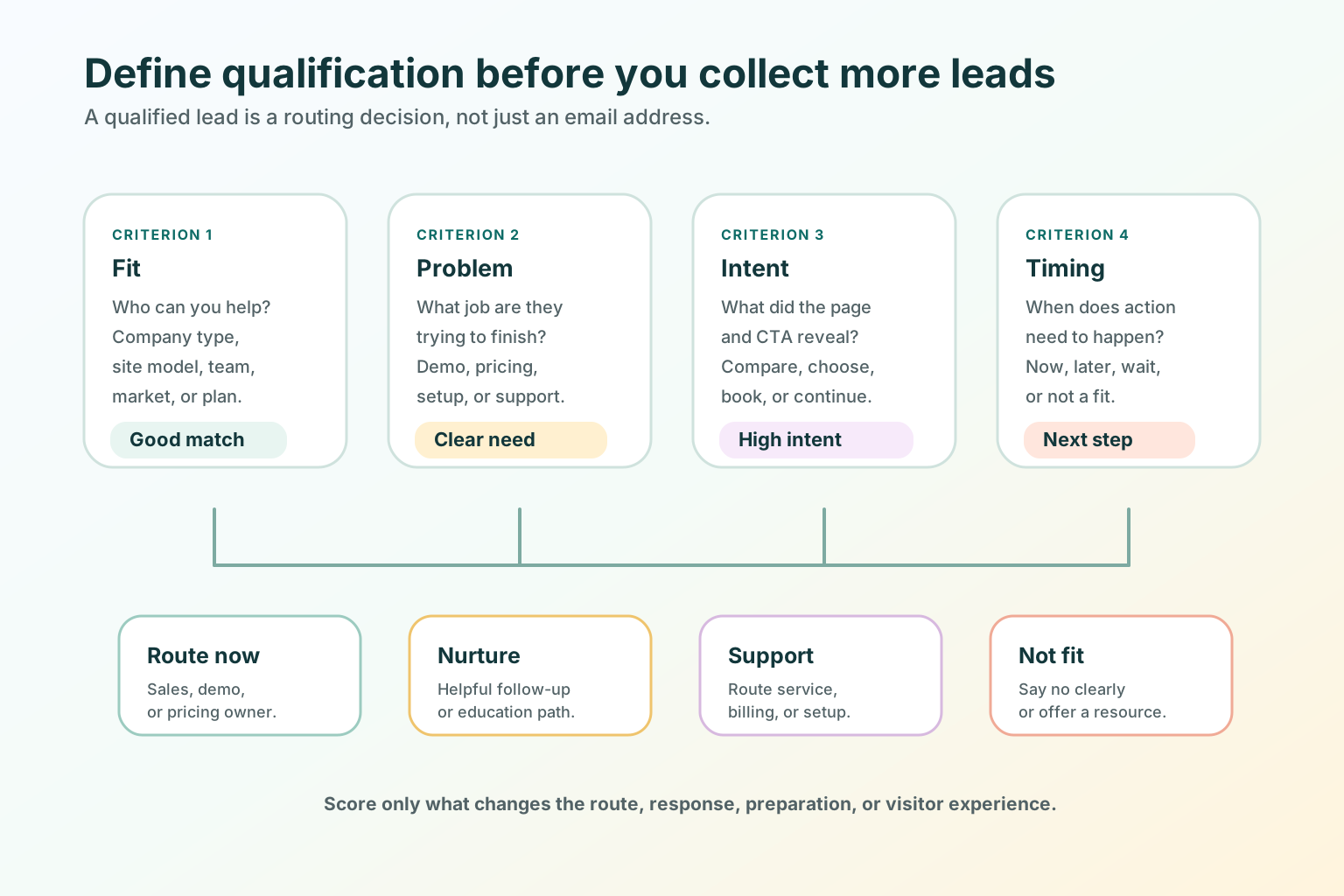
Company type, website model, team, market, or plan fits your offer.
They name a use case, page problem, campaign, workflow, or buying question.
They reached pricing, demo, setup, comparison, quote, or contact routing.
Match the capture method to the visitor moment
Every page should not ask for the same thing. The capture method should feel like the natural continuation of the page, not a trapdoor.
Do not block the answer with a sales form before value is clear.
Give enough context before asking for the next commercial step.
Explain what happens after the request and who owns the response.
Build a qualification path across pages
Qualified leads often come from a sequence, not a single page. You do not need to track every movement to improve the path. Start by making the visible route coherent.
- The guide or landing page answers the immediate question.
- The internal link points to a specific next page with descriptive anchor text.
- The pricing, demo, or contact page explains what kind of request belongs there.
- The form or CTA asks only for details that improve the next action.
- The thank-you state says what happens next.
- The owner receives context, not only a notification.
For more on matching source intent to the page, read How to Attract the Right Visitors to Your Website. For page-specific lead capture, read B2B Website Lead Capture Best Practices for Demo, Pricing, and Contact Pages.
What sales should receive from marketing
The handoff is where many qualified visitors become generic leads. The next owner should not receive only "New form submission." They should receive enough context to respond to the visitor's actual question.
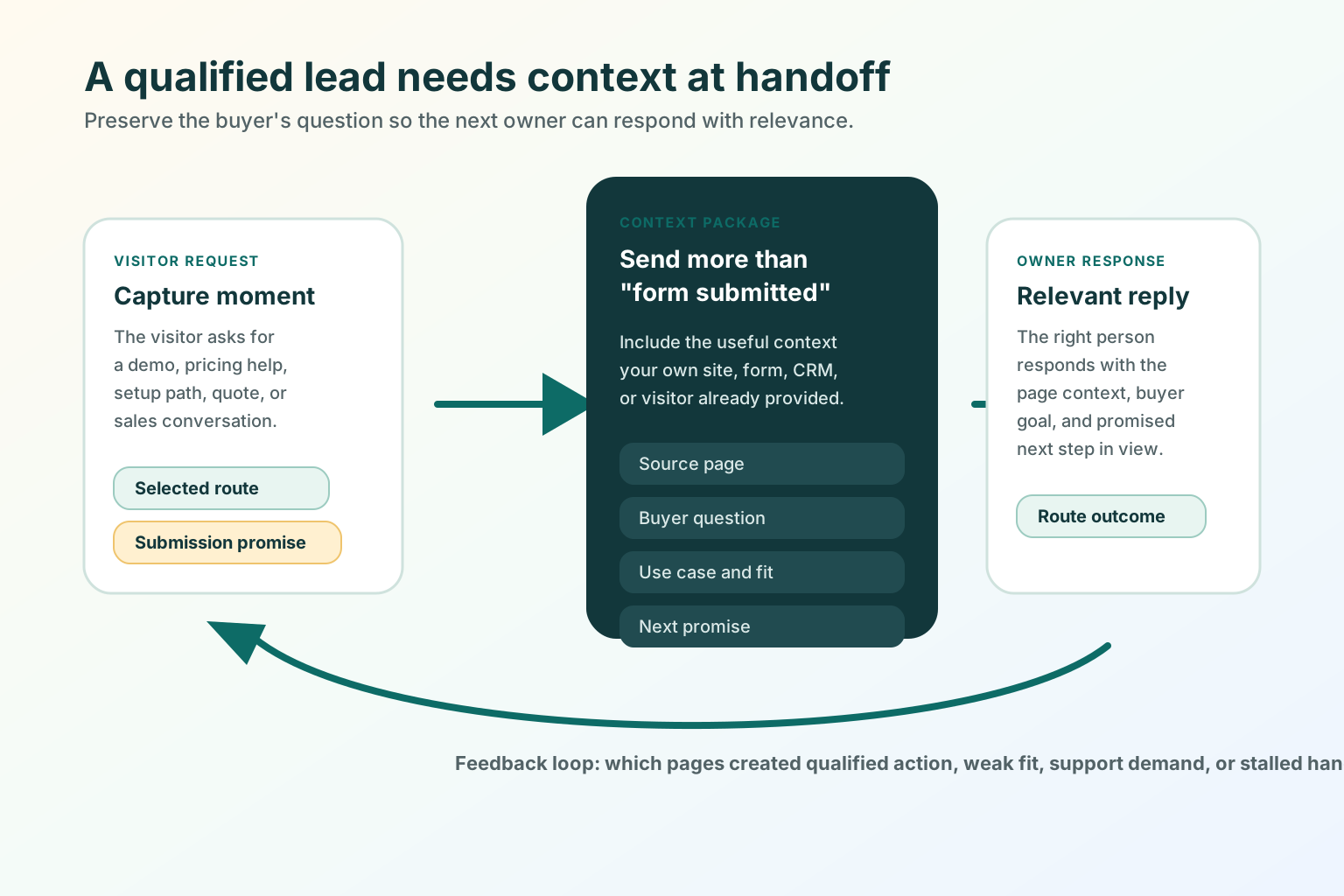
- Source page: which page or section prompted the request.
- Buyer question: demo, pricing, setup, support, billing, comparison, or quote.
- Use case: the problem the visitor described or selected.
- Fit signal: company, site type, role, plan interest, region, or team size when relevant.
- Selected route: calendar, reply, quote, trial, support, billing, or product help.
- Next promise: what the page or thank-you state told the visitor would happen.
Good use versus poor use
Good use
- Defining qualification before redesigning forms.
- Matching capture to the page's visitor moment.
- Asking for fields that improve route, response, preparation, or visitor experience.
- Giving sales, support, or success the page context behind the request.
- Measuring qualified actions by page and source.
Poor use
- Treating every email address as equally qualified.
- Measuring only form volume while lead quality drops.
- Sending demo, billing, support, and partnership requests into one inbox.
- Hiding basic answers behind a form and calling every submission "qualified."
- Using a reminder, popup, or chat takeover to compensate for an unclear page.
SEO and AEO checks for qualified lead pages
SEO and AEO for lead qualification are mostly clarity, crawlability, and alignment work. Search engines and AI assistants should be able to understand who the page is for, what question it answers, what next step it offers, and what visible content supports the structured data.
- Put the direct answer near the top in crawlable HTML text.
- Make the title, H1, meta description, and first paragraph describe the same page job.
- Use descriptive internal links with real
hrefattributes. - Keep form labels and CTA text clear enough that the next step can be understood out of context.
- Use image alt text that describes what each diagram teaches.
- Keep BlogPosting and BreadcrumbList structured data aligned with visible page content.
- Keep the Markdown alternate aligned with the HTML page so agents can read the article without JavaScript.
- Review page experience basics, including load speed, interactivity, and visual stability.
Sources used for the SEO/AEO review: Google people-first content guidance, Google link best practices, Google structured data quality guidelines, and web.dev Web Vitals guidance.
Test before you ship
- Open the page on desktop and mobile.
- Say the visitor moment out loud: learn, compare, choose, ask, or resume.
- Confirm the H1, intro, CTA, and form all match that moment.
- Remove any field that does not change routing, preparation, response, or visitor experience.
- Submit a test request for every route.
- Confirm the thank-you state repeats the promised next step.
- Confirm the owner receives source page, selected route, use case, contact details, and next promise when available.
- Check the page title, meta description, canonical URL, internal links, image alt text, structured data, sitemap entry, and Markdown alternate.
- Review qualified outcomes after the handoff, not only the number of submissions.
Where TitleFlash fits
TitleFlash does not qualify leads, replace your CRM, score visitors, or track customer-site analytics. It should not be used to cover for unclear pages, poor routing, or forms that ask the wrong questions.
It fits after the page already gives the visitor a useful path. If someone opens a pricing page, demo page, guide, setup flow, cart, or contact form and then switches tabs, a short inactive-tab title can help them notice the unfinished task again.
Rescue more qualified demand before it disappears.
The exported TitleFlash script is self-contained. It does not call TitleFlash after installation, does not load a TitleFlash CDN, and does not send visitor analytics back to TitleFlash at runtime.
Build a tab-title flow free