B2B landing page first screen
Best 5 Above-the-Fold Fixes for B2B Landing Pages
Fix a weak B2B landing page first screen by clarifying fit, outcome, proof, next step, and mobile scan quality before you redesign the whole page.
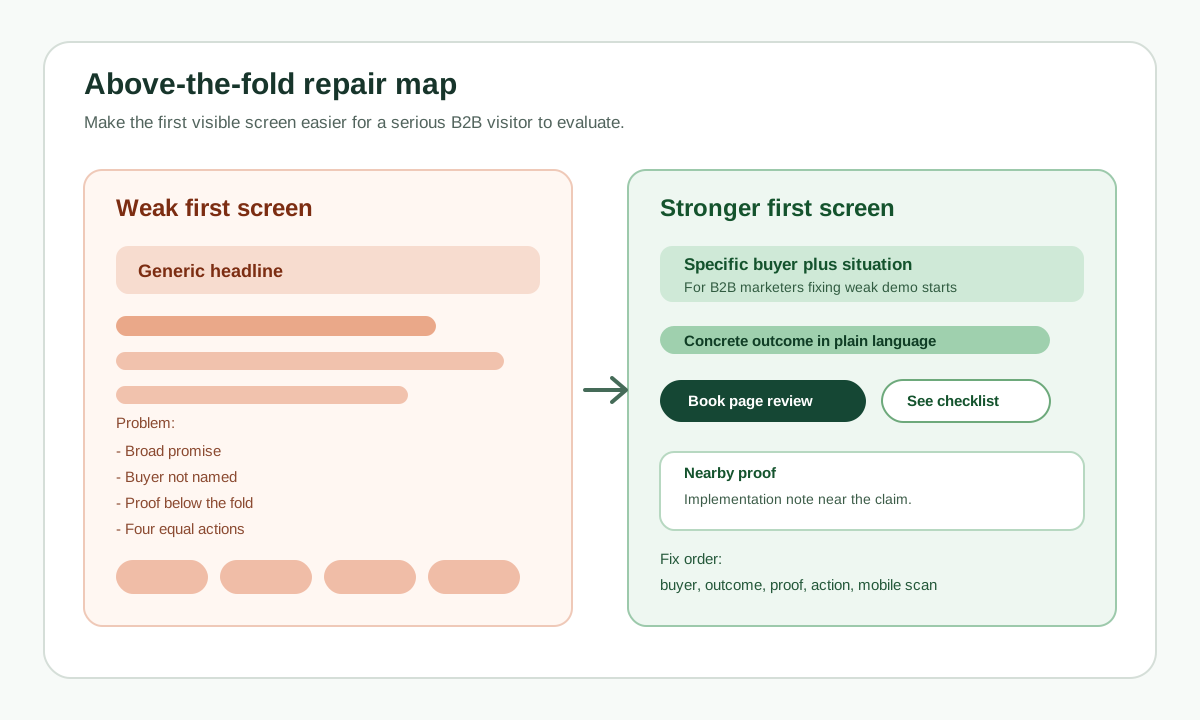
On this page
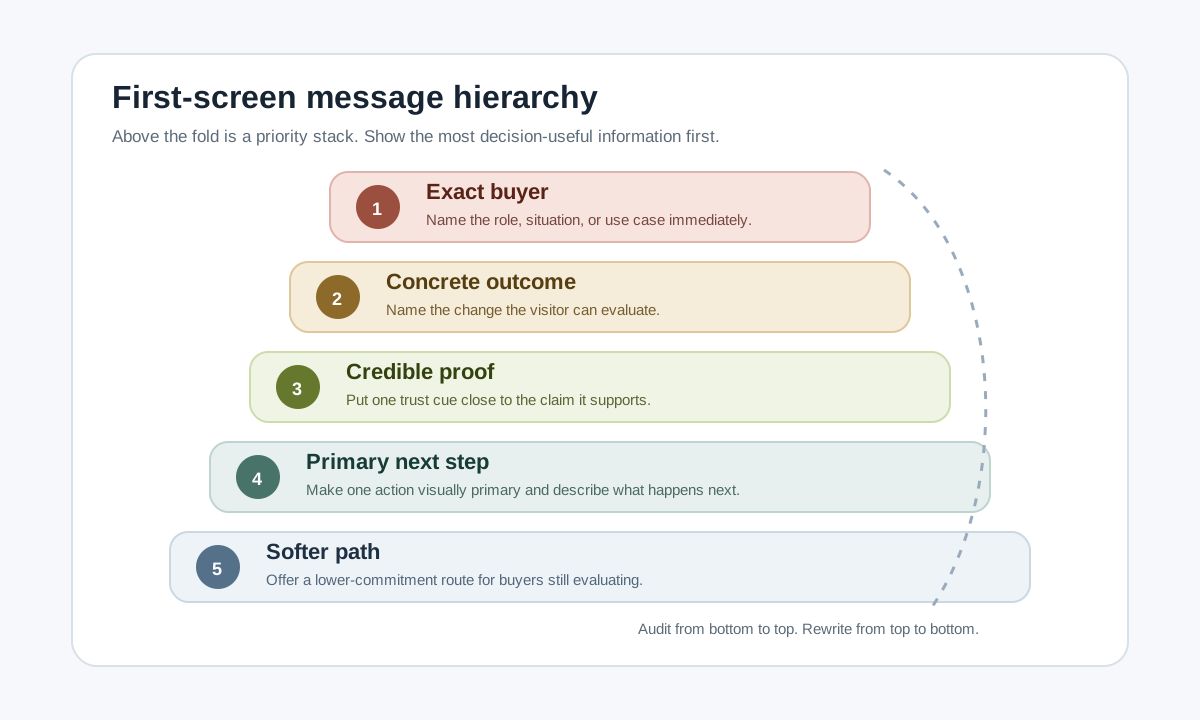
The best above-the-fold fixes for a B2B landing page are the ones that help a serious visitor understand fit quickly: name the exact buyer and situation, make the promised outcome concrete, put proof near the claim, give one primary next step plus one softer path, and remove scan friction on mobile.
"Above the fold" does not mean every important thing must fit into one screen. It means the first visible screen should earn the next action. On desktop, that might be a full hero area. On mobile, it might be a headline, one proof cue, and a CTA before the visitor starts scrolling.
This guide is for teams revising a page that gets visits but weak engagement, low form starts, vague feedback, or too many unqualified inquiries. Use the five fixes below before you redesign the whole page.
The quick answer
The five best above-the-fold fixes for B2B landing pages are:
- Name the exact buyer and situation.
- Make the promised outcome concrete.
- Put credible proof near the claim.
- Give one primary next step and one softer path.
- Remove scan friction on mobile.
Do them in that order. A faster page will not rescue a vague message. A stronger CTA will not fix an offer that hides who it is for. Proof works better after the visitor understands the claim it supports.
What above the fold should do for a B2B buyer
The first screen of a B2B landing page has one job: help the right visitor decide whether the page is worth more attention.
NN/g's fold guidance is useful because it avoids two bad extremes. Users do scroll, so you do not need to cram the whole page into the first screen. But what appears at the top still matters because it is visible with the lowest effort. If the top looks irrelevant, vague, or hard to evaluate, many visitors will not go looking for the useful section buried five screens down.
B2B pages have an extra burden. The visitor may not be the final buyer. They may be researching options for a team, collecting evidence for a manager, checking implementation risk, or deciding whether the page is worth sharing internally. Gartner's 2026 buyer research also reinforces that many B2B buyers prefer low-friction, self-directed buying experiences, while still using sales conversations for validation. That means the first screen should reduce uncertainty before it asks for a high-commitment action.
A useful B2B first screen should answer five questions:
- Who is this for?
- What situation or problem does it address?
- What useful outcome can the visitor expect?
- Why should the claim be believed?
- What is the best next step if the visitor is interested but not yet ready for sales?
1. Name the exact buyer and situation
Why it matters
Most weak B2B first screens try to sound broad: "Scale smarter," "Unlock growth," "Automate your workflow," or "The platform built for modern teams." That copy can fit almost any company, which means it does not help the right visitor recognize themselves.
NN/g's B2B UX research says B2B websites need to support both end users and decision makers across long purchase cycles. The first screen does not need to address every committee member, but it should identify the page's primary audience and situation.
How to apply it
Write the first screen around a specific buyer context:
- Role or team: demand generation, founder, lifecycle marketer, RevOps, ecommerce manager.
- Situation: launching a landing page, fixing weak demo starts, reducing popup dependence, exporting a self-contained script.
- Constraint: small team, no developer help, privacy review, short launch window, low traffic budget.
- Use case: recover distracted visitors, qualify demo interest, explain implementation, compare approaches.
Use that context in the headline or first supporting line. If the page is for multiple roles, choose the one most likely to arrive from the campaign and add a secondary line for the second role.
Example or diagnostic
Weak:
The smarter way to engage your visitors.
Stronger:
For B2B marketers trying to improve pricing-page form starts without adding another popup.
The stronger version is not perfect, but it gives the visitor a clear audience, page context, and use case. It also helps poor-fit visitors self-select out before they waste time.
Diagnostic: remove your logo and product name from the first screen. If a competitor could use the same headline without editing, the buyer and situation are probably too vague.
QA check
The buyer signal passes if:
- A right-fit visitor can say "this is for me" within five seconds.
- The first visible text names either the role, situation, or use case.
- The page does not depend on the nav, footer, or later sections to explain who it serves.
- The first screen does not try to speak to every possible industry at once.
2. Make the promised outcome concrete
Why it matters
A B2B visitor needs to know what changes if they keep reading, book a demo, start a trial, or download the resource. "Better engagement" is weaker than "help pricing-page visitors return after they leave the tab" because the second phrase gives the visitor something to evaluate.
Google Ads landing-page guidance says visitors expect the page to be relevant to what they clicked and recommends useful, original information about the product or service. Even if the traffic is not from ads, the same rule applies: the page should continue the promise that brought the visitor there.
How to apply it
Make the outcome specific enough to test:
- Name the before state: visitors leave, form starts are weak, demos are unqualified, first-screen scrolls are low.
- Name the after state: clearer fit, more qualified next steps, a calmer return path, faster evaluation, less confusion.
- Add a mechanism: self-contained script, buyer-path checklist, proof cluster, implementation guide, pricing context.
- Avoid impossible or unsupported guarantees.
For a B2B landing page, the best outcome is often not "more leads." A better outcome is "more right-fit visitors understand the page and choose the next step that matches their readiness."
Example or diagnostic
Weak:
Improve conversions with AI-powered engagement.
Stronger:
Help qualified demo visitors understand the offer, see proof, and choose a next step without a popup blocking the answer.
The stronger version still needs proof, but it gives a buyer something concrete to judge.
Diagnostic: ask, "What can a visitor verify from this page?" If the answer is only "we are innovative," rewrite the outcome.
QA check
The outcome passes if:
- The first screen names a real visitor problem or decision.
- The promised outcome is visible without scrolling.
- The outcome is supported by page content, not only by a headline.
- The copy does not imply a guaranteed conversion lift, ranking gain, or revenue result without source-backed evidence.
3. Put credible proof near the claim
Why it matters
Proof works best when it answers the doubt created by the claim. For a broader B2B page-proof model, see Website Homepage Marketing Best Practices for B2B Teams. If the claim is "built for security-conscious teams," a generic logo strip is weaker than a concise note about deployment model, implementation control, or privacy boundary. If the claim is "used by B2B marketers," a specific customer quote, case-study detail, or workflow screenshot helps more than a vague "trusted by teams" line.
Google Ads recommends useful landing page information and says reviews can show real customer opinions. FTC guidance adds an important guardrail: endorsements should be honest and not misleading, and cannot be used to make claims the marketer could not legally make directly.
How to apply it
Place proof close to the specific claim it supports:
- Under the headline: one concrete customer, category, or implementation cue.
- Near the CTA: what happens next, how long it takes, what the visitor receives.
- Near a technical claim: a short architecture note, integration list, or compatibility detail.
- Near a risk-sensitive claim: security, privacy, compliance, support, or ownership detail.
Use proof that is specific and current. Logos need permission and context. Testimonials need accurate attribution and disclosure where relevant. Metrics need a source, timeframe, and scope.
Example or diagnostic
Weak proof:
Trusted by fast-growing teams.
Stronger proof:
Exports a self-contained script with no hosted runtime dependency after installation.
For a technical tool, the stronger proof supports a real buyer concern: what happens after install. For another B2B page, the proof might be a customer quote, implementation timeline, security note, integration detail, or representative pricing cue.
Diagnostic: underline every claim in the first screen. Then write the proof that makes each claim believable. If a claim has no nearby proof, either add proof or soften the claim.
QA check
The proof passes if:
- At least one credibility cue appears in or near the first screen.
- The proof supports the main claim, not a different part of the page.
- Any review, testimonial, logo, or case-study result is accurate and allowed.
- The proof does not use fake urgency, unverified numbers, or claims that legal, sales, or product teams cannot stand behind.
4. Give one primary next step and one softer path
Why it matters
Many B2B visitors are serious but not ready for the highest-commitment action. Gartner's self-directed buying research is a useful reminder that buyers often want to evaluate on their own terms. A first screen that only says "Book a demo" may lose visitors who need pricing context, implementation details, a checklist, or a comparison before they talk to sales.
That does not mean the page should show five equal buttons. Google Ads recommends making it quick and easy for people to perform the action you want them to take, and matching the CTA to the page promise. For more examples of action copy and hierarchy, read Website CTA Best Practices.
How to apply it
Choose one primary CTA, then add one softer path for lower-readiness visitors:
- Primary: Book a demo.
- Soft path: See pricing.
- Primary: Start free.
- Soft path: Read setup guide.
- Primary: Get the checklist.
- Soft path: See examples.
- Primary: Request a quote.
- Soft path: Compare options.
The soft path should not hide the main action. It should reduce premature exits from serious visitors who need more information first.
Example or diagnostic
Weak first-screen actions:
- Get started
- Learn more
- Talk to us
- Watch video
- Contact sales
Stronger first-screen actions:
- Primary: Book a 20-minute demo
- Softer path: See implementation notes
The stronger version tells the visitor what will happen and gives a useful path for evaluation.
Diagnostic: ask a teammate to identify the primary action in three seconds on desktop and mobile. If they hesitate, the visual priority is unclear.
QA check
The action path passes if:
- One CTA is visually primary.
- The CTA text describes what happens next.
- The softer path serves a real evaluation need.
- Buttons do not wrap awkwardly or overflow on mobile.
- The CTA destination works and matches the promise.
5. Remove scan friction on mobile
Why it matters
Above the fold is not one universal rectangle. For a wider interruption-free page diagnosis, read How to Reduce Bounce Rate Without Adding More Popups. A desktop hero can hide problems that appear immediately on mobile: clipped headlines, buried CTAs, proof below the first swipe, oversized nav, sticky banners, unreadable type, layout shift, or an overlay that blocks the answer.
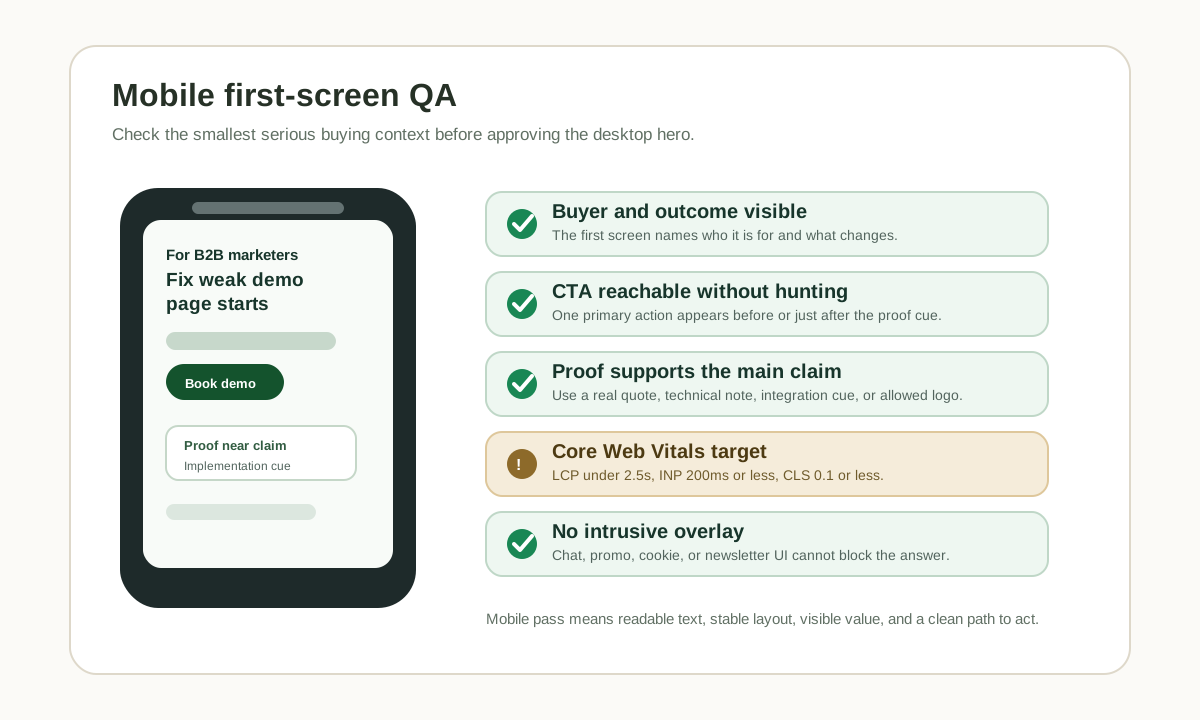
NN/g recommends front-loaded, scannable content with clear headings, bullets, and plain language. Google Search Central recommends checking mobile display, intrusive interstitials, and whether main content is easy to distinguish. web.dev gives concrete Core Web Vitals thresholds for loading, interactivity, and visual stability.
How to apply it
Review the first screen on a real mobile viewport before revising the desktop design:
- Keep the headline specific and short enough to read without awkward wrapping.
- Put the main CTA within easy reach after the value and proof cue.
- Let one proof cue appear before or near the first CTA.
- Avoid cookie, chat, newsletter, or promo overlays that block the first answer.
- Check that sticky bars do not cover the CTA or first proof.
- Test speed and stability against Core Web Vitals thresholds.
Example or diagnostic
Desktop first screen looks fine:
- Big headline.
- Hero image.
- CTA row.
- Logo proof.
Mobile first screen fails:
- Headline wraps into six lines.
- CTA falls below the first swipe.
- Logo proof disappears.
- Chat bubble covers the softer path.
- Hero image loads before the text and hurts LCP.
Fix the mobile first screen by prioritizing text and action over decorative media. A strong mobile top can still look polished, but it should not make buyers hunt for the answer.
QA check
The mobile scan passes if:
- The buyer and outcome are visible before the first scroll.
- The primary CTA is visible or immediately reachable after one short scan.
- One proof cue appears before the visitor is asked to commit.
- Body text is readable without pinch zooming.
- No overlay blocks the main content.
- The page targets LCP within 2.5 seconds, INP at 200 milliseconds or less, and CLS at 0.1 or less at the 75th percentile across mobile and desktop.
Before-and-after examples
Use these examples as patterns, not as copy to paste blindly.
Example 1: vague SaaS hero
Weak:
Unlock growth with the engagement platform for modern teams.
Get started | Learn more | Talk to sales
Stronger:
For lean B2B marketing teams that need more qualified demo visitors to understand the page before booking.
Fix the first-screen promise, proof, and CTA path without adding another popup.
Book a 20-minute page review | See the checklist
Why it works better:
- It names the team.
- It names the page problem.
- It gives a specific outcome.
- It keeps one primary action and one soft path.
Example 2: technical product page
Weak:
The all-in-one solution for secure automation.
Schedule a call.
Stronger:
Self-contained campaign scripts for marketing teams that cannot add another hosted runtime.
Build, preview, and export a script your site can run without vendor-hosted calls after installation.
Create a test script | Read the install model
Why it works better:
- It speaks to a real buyer constraint.
- It explains the mechanism.
- It puts a trust-relevant proof cue near the claim.
- It offers a lower-commitment evaluation path.
Example 3: demo page
Weak:
See what our platform can do.
Book a demo.
Stronger:
See how B2B teams qualify inbound page visitors before they reach sales.
Review the routing, handoff, and proof workflow in a 20-minute demo.
Book a demo | See lead-capture examples
Why it works better:
- It narrows the demo promise.
- It explains what the conversation covers.
- It gives an evaluator a second path if they need examples first.
What not to cram into the first screen
Do not turn "above the fold matters" into "everything belongs above the fold." A crowded first screen can become harder to scan than a page that asks for one clear scroll.
Avoid cramming in:
- Full feature grids.
- Long product videos that load before the message.
- Multiple equal CTAs.
- Every customer logo.
- Full pricing tables.
- Dense security claims.
- Chat, newsletter, cookie, and promo overlays at the same time.
- Huge decorative images that push the message below the first screen.
The first screen should set the frame. The rest of the page should carry the evidence.
Mobile-first review checklist
Before you ship the revised first screen, check this on a mobile viewport and a desktop viewport. For a wider pre-traffic launch pass, read Top 5 Things Every New Landing Page Must Do Before You Send Traffic:
- Can a new visitor name the buyer and situation in five seconds?
- Is the promised outcome concrete enough to evaluate?
- Is one proof cue close to the claim?
- Is there one primary CTA and one clear softer path?
- Does the CTA text say what happens next?
- Does the page continue the promise from the ad, email, post, or source link?
- Is the first proof cue real, allowed, and not misleading?
- Is the main content clear without an intrusive overlay?
- Does the first screen avoid awkward text wrapping or clipped buttons?
- Are LCP, INP, and CLS within good-threshold targets at the 75th percentile?
If the page fails several checks, do not start with a full redesign. Rewrite the first screen, reduce competing actions, move one proof cue up, and test again.
Where TitleFlash fits
TitleFlash should not be used to cover for a weak first screen. If the page is vague, slow, or asking for the wrong action, fix that first.
Where TitleFlash can help is after the first screen already gives a good-fit visitor a clear reason to continue. Some visitors will still switch tabs during evaluation. A calm browser-tab title flow can remind them what they were doing and help them return without a popup, push notification, or hosted runtime dependency.
Keep the boundary clear:
- TitleFlash builds and exports a self-contained browser-tab script.
- The installed script does not depend on a TitleFlash CDN or hosted runtime.
- TitleFlash is not an analytics, attribution, personalization, lead-scoring, or A/B testing tool.
- It should complement clear page messaging, not replace it.
Use it only when the page has already earned the visitor's attention.
Build a calm return-path reminder.
The exported TitleFlash script is self-contained. It does not call TitleFlash after installation, does not load a TitleFlash CDN, does not track visitors, and does not send customer-site visitor analytics back to TitleFlash at runtime.
Build a tab-title flow free