Landing page QA
Top 5 Things Every New Landing Page Must Do Before You Send Traffic
Check first-screen promise, offer match, one action, proof, and page experience before paid clicks or launch traffic make weak spots expensive.
On this page
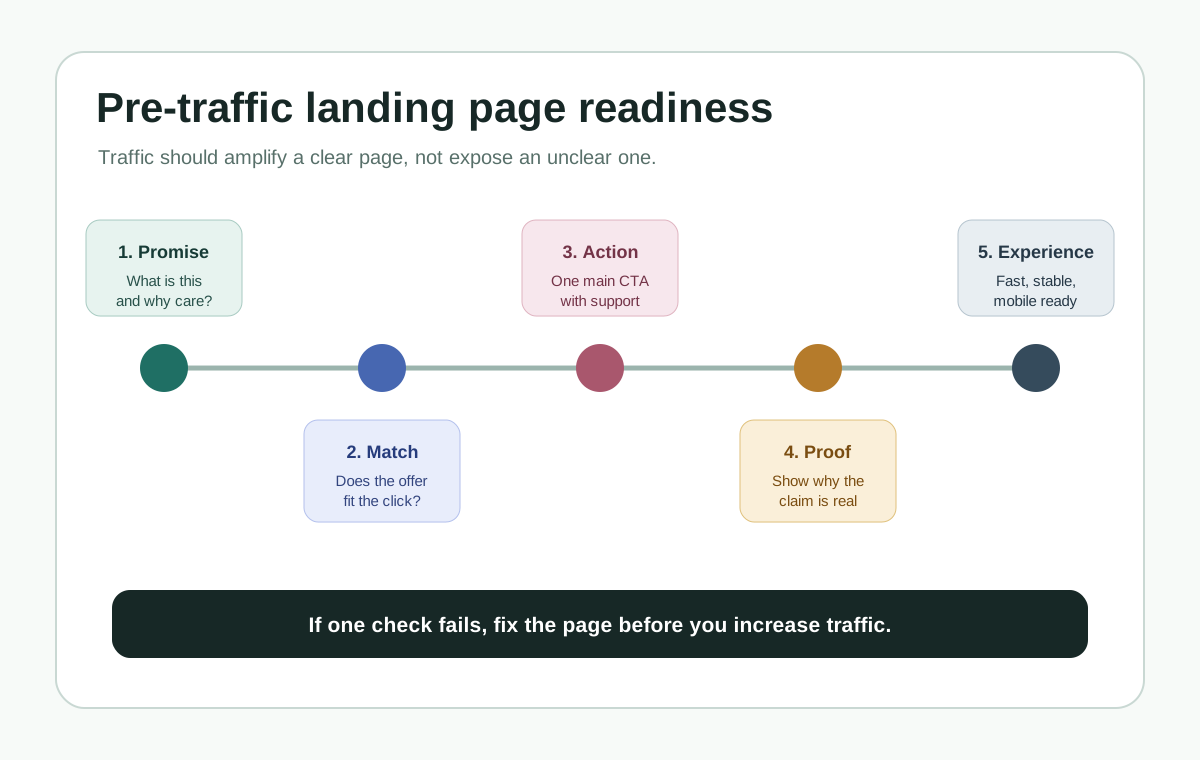
Before you send traffic to a new landing page, make sure the page can pass five checks: a clear first-screen promise, audience-offer match, one primary action, proof near the decision, and a fast, stable, easy-to-scan page experience.
Traffic does not fix a weak landing page. It makes the weakness expensive. If the page is unclear, mismatched, slow, or asking for the wrong action, more visits only produce more exits, bad leads, and noisy data.
This guide is for founders, marketers, and operators who are about to send paid traffic, launch traffic, partner traffic, social traffic, or outbound traffic to a new page. Use it as a practical ship-or-fix checklist before the page goes live.
The quick answer
The top five landing page must-haves before traffic are:
- Make the first-screen promise obvious.
- Match the offer to the visitor's actual stage.
- Choose one primary action and support it.
- Put proof close to the decision point.
- Make the page fast, stable, mobile-ready, and easy to scan.
If one of these checks fails, fix that before you buy clicks, announce the page, or send the campaign. You do not need a perfect page. You need a page that a right-fit visitor can understand, trust, and act on without extra explanation.
Why traffic makes weak pages more expensive, not better
A landing page is the page people reach after clicking an ad or campaign link. Google Ads describes landing page experience through usefulness, relevance, navigation, links, and the expectations created by the clicked ad. That is a useful practical standard even when your traffic source is not Google Ads.
Before traffic, a weak landing page is a draft problem. After traffic, it becomes a budget problem, a lead-quality problem, and a learning problem.
- Attention waste: visitors leave before they understand the offer.
- Fit waste: the page attracts or persuades the wrong people.
- Decision waste: interested visitors cannot tell what to do, why to trust it, or what happens next.
For B2B or high-consideration pages, fit waste matters as much as raw conversion. A pre-traffic page should help good-fit visitors move forward and help poor-fit visitors self-select out before they submit a form, book time, or distort your campaign data.
1. Make the first-screen promise obvious
Why it matters
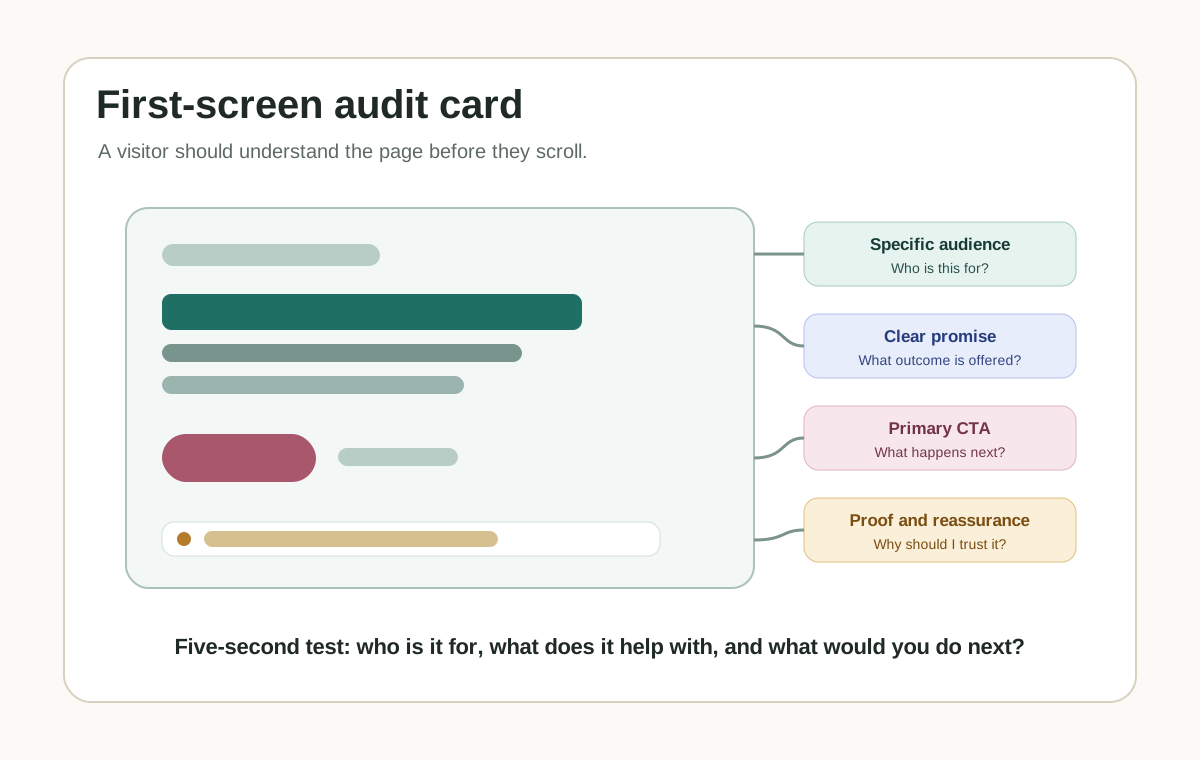
The first screen should tell the right visitor what the page is about, who it is for, and why they should keep reading. NN/g's user-behavior research says users often leave pages in 10 to 20 seconds, and that a clear value proposition can hold attention longer. That does not mean every visitor behaves the same way. It means the first screen has to earn the next few seconds.
This is the highest-priority check because every other page element depends on it. If the promise is vague, the visitor has to do interpretation work before they can evaluate the offer. For broader launch checks around the first screen, see the website launch checklist for founders.
How to apply it
- Name the audience or situation.
- State the outcome or job the page helps with.
- Add one concrete detail that makes the offer believable.
- Show the primary action without making it the only visible information.
Example or diagnostic
Weak first screen:
Better marketing starts here.
Stronger first screen:
Turn abandoned pricing-page visits into a calmer return path with a self-contained browser-tab message.
The stronger version names the page job, the use case, and the mechanism. A visitor still needs details, but they do not have to guess what the page is about.
QA check
- What is this?
- Is it for someone like me?
- What problem or outcome does it address?
- What is the primary next step?
- Is there at least one reason to believe the claim?
2. Match the offer to the visitor's actual stage
Traffic sources carry expectations. A visitor from a search ad, launch email, partner page, LinkedIn post, comparison article, or retargeting campaign arrives with a different level of awareness. Google Ads landing-page guidance says people expect a landing page to be relevant to what they clicked and recommends matching landing pages to ads, keywords, and CTA language.
The page should not ask a low-awareness visitor for a high-commitment action before the page has earned it. It also should not bury the buying path from a high-intent visitor who is ready.
| Visitor stage | What they need | Better page offer |
|---|---|---|
| Problem aware | They know the pain but not the solution. | Diagnosis, checklist, plain explanation, low-friction next step. |
| Solution aware | They compare approaches. | Comparison, tradeoffs, proof, implementation notes. |
| Vendor aware | They evaluate your offer. | Demo, pricing, trial, quote, setup path, sales contact. |
| Returning evaluator | They paused and came back. | Clear resume point, saved context, calm reminder, obvious next action. |
Example or diagnostic
Campaign promise: Landing page launch checklist
Mismatched page: Book a strategy call
Better match: Download the pre-traffic checklist, then book a page review if you want help applying it.
QA check
- Source: where will this visitor come from?
- Promise: what did the link, ad, post, or email say?
- Stage: learn, compare, choose, ask, or resume?
- Page offer: what is the page asking them to do?
- Fit signal: what tells the visitor whether this is meant for them?
- Match result: aligned, too early, too late, or unclear?
3. Choose one primary action and support it
A landing page can have secondary routes, but it should have one primary action. Google Ads guidance says the landing page should mirror the call to action in the ad text and make it quick and easy for customers to perform the desired action.
Multiple competing primary actions make the page harder to evaluate. For page-level CTA examples, read Website CTA Best Practices.
- Start a trial.
- Book a demo.
- Join the waitlist.
- Download the checklist.
- Request a quote.
- See pricing.
- Contact support.
| Weak action set | Stronger action set |
|---|---|
| Get started, learn more, talk to us, see features, contact. | Primary: Book a demo. Secondary: See pricing. Support link: Read implementation notes. |
QA check
- The primary CTA appears in the first screen on desktop and mobile.
- The CTA copy describes the next step.
- The CTA leads to the promised action, not a surprising route.
- Secondary links do not compete visually with the main action.
- The form, booking flow, checkout, or download works on mobile.
4. Put proof close to the decision point
Proof reduces uncertainty when the visitor is deciding whether the claim is believable. Google Ads recommends useful, original information and says landing pages may include reviews that show real customer opinions. NN/g warns that credibility suffers when users see exaggerated claims. The FTC also says endorsements must be truthful and not misleading.
That combination creates a practical rule: use proof, but keep it specific and honest.
- A specific customer quote.
- A case-study result with context.
- A recognizable customer logo if it is allowed and relevant.
- A short implementation note.
- A product screenshot or workflow diagram.
- A security, privacy, or integration detail when that is a likely blocker.
- A comparison or limitation that helps the right visitor self-qualify.
Avoid vague proof such as "trusted by thousands" unless you can substantiate it and it actually helps the decision. For B2B home-page proof placement, see Website Homepage Marketing Best Practices for B2B Teams.
Example or diagnostic
Weak proof: Loved by teams everywhere.
Stronger proof: Used by small ecommerce teams that want a no-CDN tab-title reminder without adding another popup.
QA check
- What would make a skeptical visitor believe this?
- Is the proof close to the claim or CTA?
- Can we substantiate the proof?
- Does the proof help the target visitor, or is it just decoration?
- Would the page still feel credible if we removed every vague adjective?
5. Make the page fast, stable, mobile-ready, and easy to scan
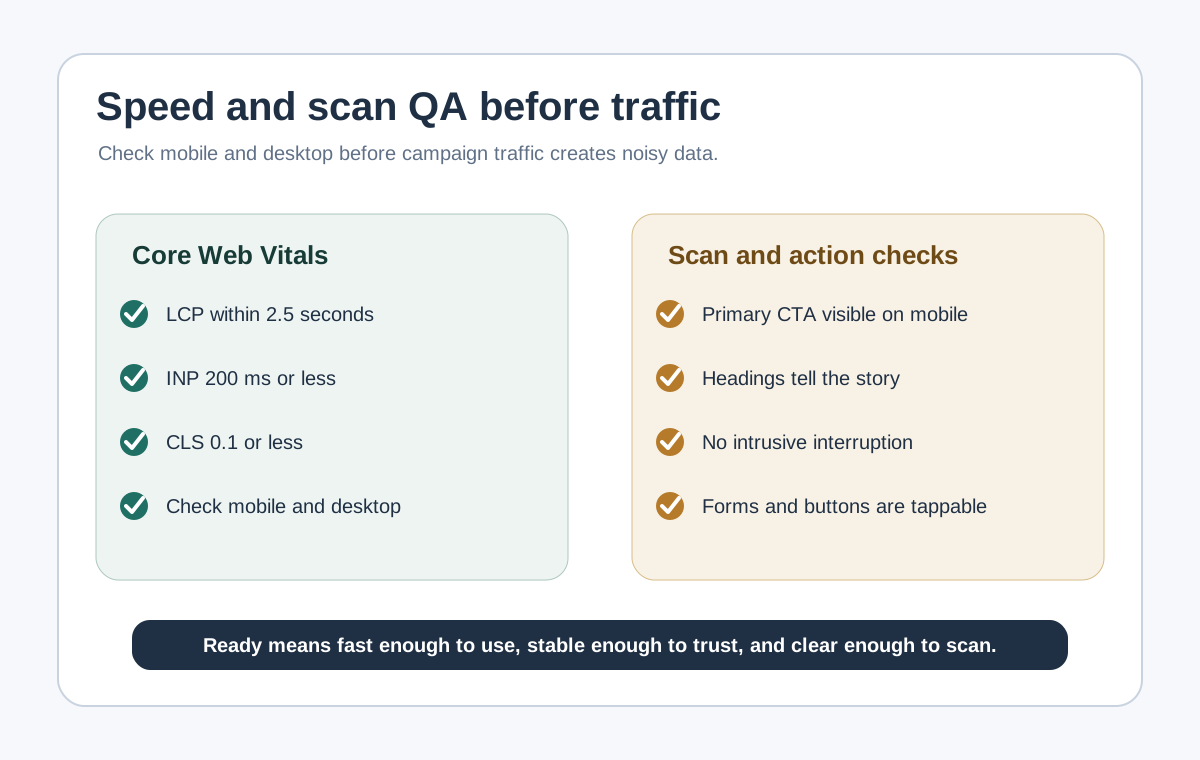
Performance and scan quality determine whether visitors can use the page at all. web.dev defines Core Web Vitals around loading, interactivity, and visual stability, with good thresholds of LCP within 2.5 seconds, INP at 200 milliseconds or less, and CLS at 0.1 or less at the 75th percentile across mobile and desktop. Google Search Central page-experience guidance also recommends checking mobile display, intrusive interstitials, excessive ads, and whether the main content is easy to distinguish.
This is not only an SEO issue. A slow, shifting, cramped, or interruption-heavy page makes every claim harder to evaluate. For more on fixing engagement without blocking content, read How to Reduce Bounce Rate Without Adding More Popups.
How to apply it
- Load the page on a mobile network or throttled connection.
- Check that the first visible content appears quickly.
- Tap the CTA and any form fields.
- Confirm no important text shifts after load.
- Check that headings and bullets tell the story when scanned.
- Remove anything that blocks the main content before the visitor understands the page.
QA check
- LCP is within 2.5 seconds in the tested environment or has a clear fix owner.
- INP is 200 milliseconds or less for key interactions, or the team knows which script or UI pattern is causing delay.
- CLS is 0.1 or less, with no visible content jumps that move the CTA or form.
- The page works on a small mobile screen without horizontal scrolling.
- The page is understandable by scanning headings, bullets, and CTA copy.
- No popup, banner, or dialog blocks the main content before the visitor understands the offer.
Pre-traffic QA checklist
| Check | Pass standard | Fix first if |
|---|---|---|
| First-screen promise | A new visitor can explain the page in five seconds. | The headline could describe almost any company. |
| Offer match | The page delivers what the traffic source promised and gives right-fit visitors a clear fit signal. | The ad, email, or post promises one thing and the page asks for another. |
| Primary action | One main CTA is obvious on desktop and mobile. | Several CTAs compete for attention. |
| Proof | Claims are supported near the decision point. | Proof is vague, far away, exaggerated, or unsupported. |
| Page experience | The page is fast, stable, scannable, and usable on mobile. | The page shifts, blocks content, loads slowly, or hides the next step. |
If the page fails more than one row, do not send paid traffic yet. If it fails only one row, decide whether the traffic source is low-risk enough for a small test.
Good use versus poor use
| Good use | Poor use |
|---|---|
| Fixing clarity before increasing spend. | Buying traffic to "see what happens" before the page explains the offer. |
| Matching the page to one traffic promise. | Using a generic headline and hoping the ad does all the work. |
| Using proof that helps a visitor decide. | Hiding pricing, fit, setup, or proof when those are obvious buying questions. |
| Reviewing page experience before traffic creates noisy data. | Adding popups, chat prompts, banners, and exit layers before the main content is clear. |
SEO and AEO checks for a landing page guide
Search engines and AI assistants can only summarize the guidance you make explicit. For this article and for your own landing pages:
- Put the answer near the top in crawlable HTML.
- Use clear headings that match the visitor's questions.
- Link internally to related pages with descriptive anchor text.
- Cite sources when you make research-backed claims.
- Keep images useful, with alt text that describes the diagram.
- Avoid invented benchmarks and unsupported conversion claims.
- Keep the page experience helpful for users instead of optimizing one metric for its own sake.
Where TitleFlash fits
TitleFlash is not a landing page builder, analytics tool, A/B testing platform, popup tool, CRM, or lead scoring system. It should not be used to compensate for a page that is unclear, mismatched, slow, or missing proof.
TitleFlash fits after the page is ready. If a visitor opens a pricing page, checklist, demo page, campaign page, or checkout path and then switches tabs, a calm inactive-tab title message can remind them where they left off.
Use it as a return-path layer, not as the main conversion strategy. The exported TitleFlash script is self-contained. It does not load a TitleFlash CDN, does not call TitleFlash at runtime, does not track visitors, and does not send customer-site visitor analytics back to TitleFlash.
Build a calm return-path reminder.
Draft the message, preview the inactive-tab moment, and export a self-contained script when your landing page already deserves the return visit.
Build a tab-title flow free