B2B buyer path design
Five Best Ways to Turn a New Web Page Into a Buyer Path
Connect a new page to fit, proof, next steps, supporting links, and respectful follow-up so qualified visitors can keep moving.
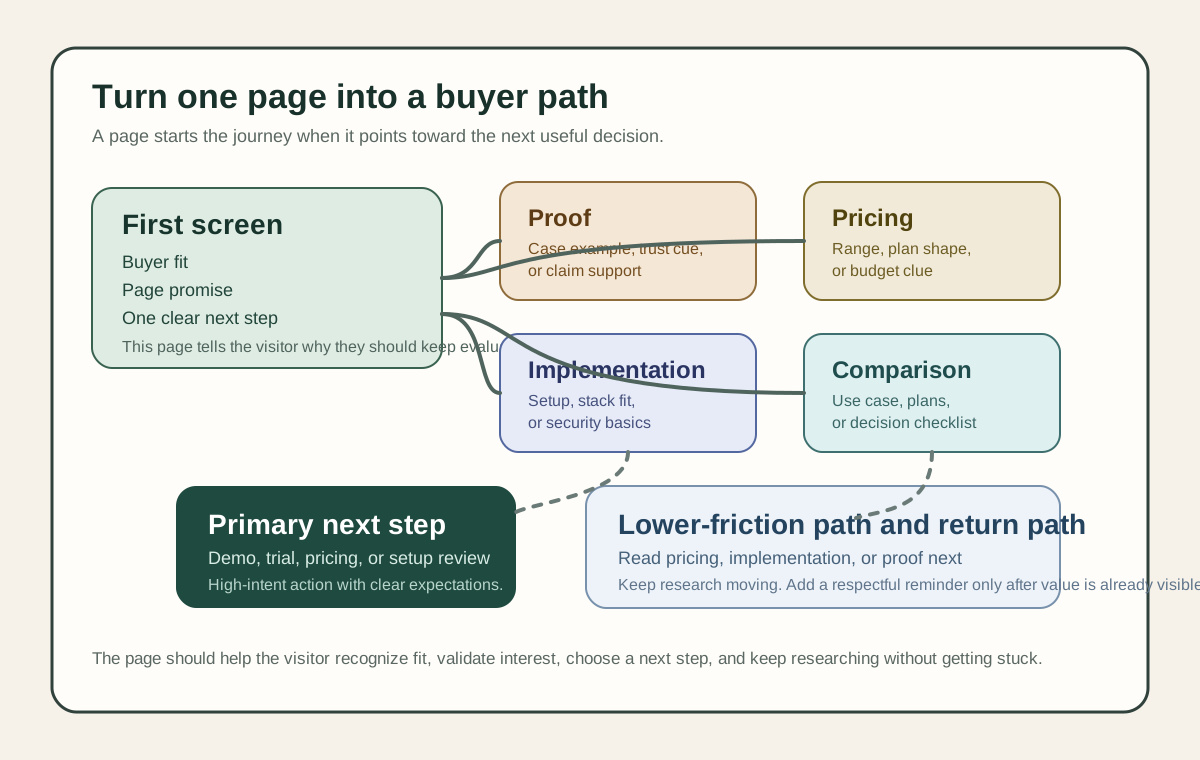
On this page
A new web page can attract attention and still fail to help a serious buyer move forward.
That usually happens when the page acts like an isolated destination. It explains one offer, shows one button, and leaves the visitor to figure out the rest alone.
Qualified buyers do not move that way. They compare, validate, look for proof, ask whether the next step is worth their time, and often continue through several pieces of information before they talk to anyone. Gartner's March 2026 buyer research and May 2026 buyer research are useful here because they show both sides of modern B2B buying: buyers want low-friction self-service research, but they still use live conversations to validate what they find.
That is why a new page should not only say one thing well. It should also help the reader take the next useful step.
The quick answer
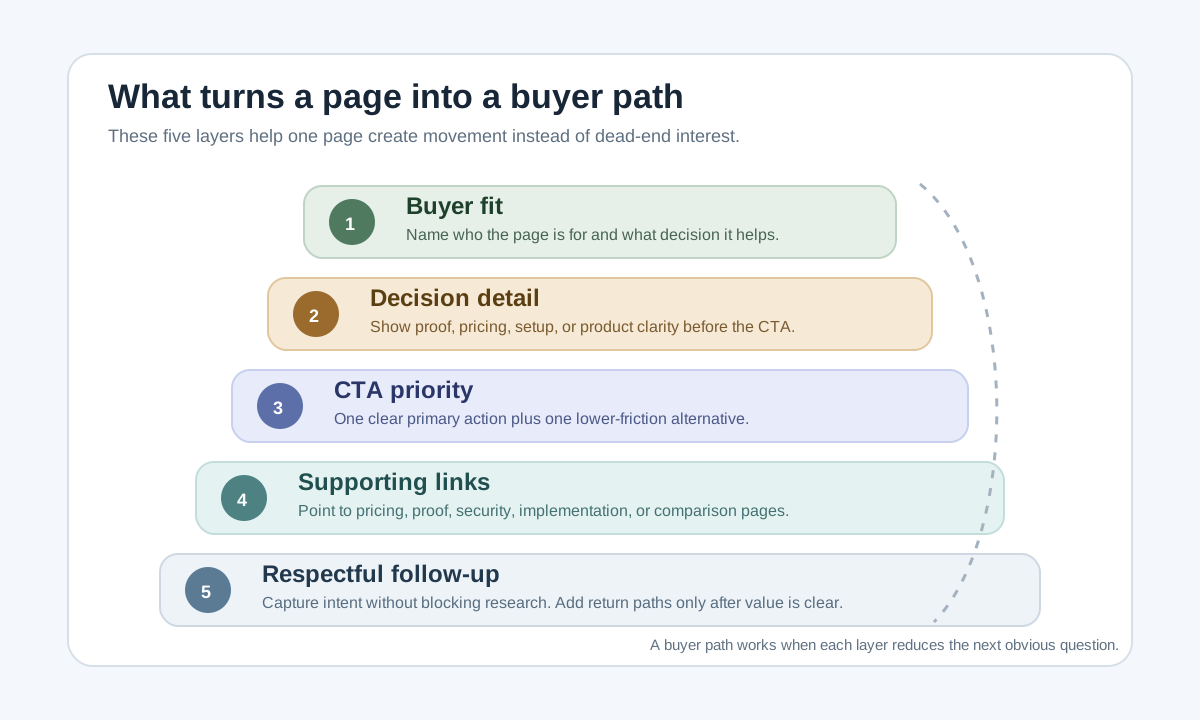
The best ways to turn a new web page into a buyer path are:
- Make the page's job and buyer fit obvious in the first screen.
- Put decision-useful proof and detail on the page before the CTA.
- Give one primary next step and one lower-friction secondary path.
- Link to the exact supporting pages buyers need next.
- Add respectful capture and return paths without blocking research.
If the page does those five things, it stops acting like a dead-end campaign asset and starts acting like part of a real buying journey.
What makes a page a buyer path
A buyer path is not only a funnel diagram. It is the sequence of decisions a visitor can make after they arrive on a page.
The page has to answer at least four questions:
- Is this for me?
- Is this credible enough to keep evaluating?
- What should I do next?
- If I am not ready yet, where should I go instead?
That sequence matters because buyers rarely make a decision from one page alone. Gartner reported that buyers in its 2025 survey used an average of seven information sources during a recent purchase. A new page should therefore make the next decision easier, not trap the reader in one incomplete pitch.
1. Make the page's job and buyer fit obvious in the first screen
Why it matters
The first screen decides whether the visitor recognizes the page as relevant.
NN/g's homepage guidance says important content should appear high on the page and that the page should quickly communicate what users can accomplish, while its B2B guidance says business sites need to support different stakeholder roles during longer purchase cycles. A new page does not need to explain everything immediately, but it does need to make the page promise obvious.
If a product page, use-case page, campaign page, or feature launch page opens with broad brand language, the buyer has to translate the value for themselves. Many will not do that work.
How to apply it
Use the first screen to answer. For a deeper first-screen model, see Best 5 Above-the-Fold Fixes for B2B Landing Pages:
- Who the page is for.
- What problem or decision it helps with.
- What the visitor will understand or be able to do after reading.
- What the next useful step is if the fit is real.
That usually means a headline, a sharper supporting sentence, one proof cue, and one clear next step.
Example patterns:
- "For B2B teams launching a new pricing page that needs clearer buyer qualification."
- "For SaaS founders who need one feature page to lead visitors toward trial, demo, or comparison."
- "For demand teams that want campaign traffic to reach proof, pricing, and setup details faster."
Example or diagnostic
Weak first screen:
"Modern software for ambitious teams."
Stronger first screen:
"For B2B teams launching a new feature page that needs to move serious buyers from curiosity to comparison."
Diagnostic: show only the first screen to three target readers for ten seconds. Ask:
- Who is this page for?
- What problem does it solve?
- What would you do next?
If the answers are vague, the first screen is not doing enough.
QA check
Before publishing, confirm:
- The page names a real buyer, team, or use case.
- The first screen states the page's job, not only the brand promise.
- A visitor can tell what the page leads toward next.
- The headline still makes sense without the company name.
2. Put decision-useful proof and detail on the page before the CTA
Why it matters
New pages often send visitors to a CTA before the page has earned that move.
NN/g's B2B product-spec guidance says buyers compare products against real requirements and need specific details about how a product works and fits into larger systems. Its B2B UX guidance also points to cost, reliability, integration effort, and evidence as decision-maker concerns.
That means a new page should usually include enough detail to answer "Should I keep evaluating?" before it asks, "Do you want a demo?"
How to apply it
Add proof and detail that reduce the buyer's next uncertainty. For demo-stage buyer questions, see Top 10 Things B2B Buyers Look For Before They Book a Demo:
- What the product or offer actually does.
- Who it is best for.
- A concrete use case or workflow.
- Proof from a similar buyer or customer segment.
- Pricing context, budget clue, or plan shape when relevant.
- Setup, integration, security, or implementation detail when that affects fit.
Do not add every possible detail to one page. Add the details that remove the biggest obvious doubt, then link to the next supporting pages for the rest.
Example or diagnostic
Weak page pattern:
- Short hero.
- Product screenshot.
- "Book a demo."
Stronger page pattern:
- Sharp first-screen promise.
- Short "how it works" explanation.
- One proof point tied to a real claim.
- A pricing or setup clue.
- A CTA only after the visitor can judge whether more attention is worthwhile.
Diagnostic: highlight every sentence that helps a buyer compare, validate, or de-risk the offer. If the page has almost none before the CTA, it is not yet a buyer path.
QA check
The page should answer:
- What is being offered.
- Why a serious buyer should believe it.
- What the buyer needs to know before taking the next step.
- Which uncertainties are answered here versus on the next supporting page.
3. Give one primary next step and one lower-friction secondary path
Why it matters
Many new pages fail because they offer too many equal-priority actions.
NN/g's homepage guidance says high-priority tasks need clear visual hierarchy and that if everything is emphasized, nothing stands out. At the same time, NN/g's form guidance shows why high-friction forms need clarity and expectation-setting.
A buyer path needs direction. That does not mean one button only. It means one clear primary move plus a lower-friction alternative for visitors who are interested but not ready for the highest-commitment action.
How to apply it
Pick the page's primary action first. For action-copy examples, read Website CTA Best Practices:
- Start a trial.
- Book a demo.
- View pricing.
- See implementation steps.
- Download the technical guide.
- Compare plans.
Then add one secondary path for lower-intent visitors:
- Read the comparison page.
- Watch a short walkthrough.
- See setup requirements.
- Review customer examples.
- Email the guide to yourself.
Make the primary CTA visually strongest. Make the secondary path clear but quieter.
Example or diagnostic
Messy CTA set:
"Book a demo" / "Start free" / "Contact sales" / "Read the blog" / "Talk to support"
Stronger CTA set:
Primary: "See pricing and plan fit"
Secondary: "Read the implementation checklist"
Diagnostic: blur the page or view it at 25 percent zoom. If three or four actions compete for attention, the visitor is doing prioritization work that the page should have already done.
QA check
Before publishing, confirm:
- One action is clearly primary.
- One lower-friction action exists for not-yet-ready buyers.
- The page explains what happens after the primary CTA.
- Any form or booking action includes time, fields, and follow-up expectations.
4. Link to the exact supporting pages buyers need next
Why it matters
Internal links are part of buyer guidance, not only SEO plumbing.
Google's crawlable-links guidance recommends real links with descriptive anchor text, and Google's people-first content guidance reinforces the idea that content should help people achieve their goal. That is useful beyond search because a buyer path depends on knowing where to go next.
If the visitor reaches a new page and cannot easily reach pricing, implementation, security, proof, comparison, or demo expectations, the page becomes a dead end.
How to apply it
Link toward the next decision-specific pages. For a related self-directed buyer research model, see 10 Non-Obvious Ways to Attract B2B Buyers to Your Website:
- Pricing page or plan comparison.
- Product specs or implementation requirements.
- Security or privacy basics.
- Case study or customer proof.
- Demo expectations or contact page.
- Related use-case or comparison page.
Use descriptive anchors that tell the reader why the link matters:
- "See implementation requirements"
- "Compare plans and pricing"
- "Read security basics"
- "See how this fits ecommerce teams"
Avoid vague anchors like "learn more" when the destination matters.
Example or diagnostic
Weak linking:
"Learn more"
"Explore more"
Stronger linking:
"Compare pricing and setup effort"
"Read the buyer checklist before booking a demo"
Diagnostic: pretend the visitor is convinced enough to continue, but not enough to book. Can they reach the next exact proof, pricing, or implementation page in one click?
QA check
Review the page for:
- Descriptive anchor text.
- Real
hreflinks, not script-only click handlers. - Links to the next likely buyer question, not only top-nav destinations.
- At least one path for a high-intent reader and one for a research-mode reader.
5. Add respectful capture and return paths without blocking research
Why it matters
A buyer path should help the visitor stay in motion, not force commitment too early.
NN/g's content-behind-forms guidance says early buying-cycle users need to understand what a product does and how it benefits them, and that premature gating can create distrust. Its form guidance adds that expectation-setting reduces form friction.
That means the page should preserve access to the basics while still offering capture when intent is real.
How to apply it
Use respectful capture patterns. For page-specific form and handoff guidance, see B2B Website Lead Capture Best Practices for Demo, Pricing, and Contact Pages:
- Keep the most important product, proof, and fit information visible before a form.
- Use short, transparent forms for high-intent actions.
- Explain what happens after submission.
- Offer a lower-commitment fallback path for visitors still researching.
- Add a light return path on high-intent pages after the page has already delivered useful information.
For TitleFlash, that return path can be a self-contained browser-tab reminder on pages where the visitor already showed clear interest and then switched away. It should not replace useful content, buyer-proof detail, or transparent page structure.
Example or diagnostic
Poor pattern:
The page shows a broad promise, then blurs the rest behind a form before the visitor can judge fit.
Stronger pattern:
The page explains fit, proof, and next steps first, then offers a clear form or softer path. If the visitor leaves the tab on a high-intent page, a respectful tab-title reminder may help them return without adding runtime tracking.
Diagnostic: remove the form temporarily and read the page straight through. If the core value disappears with the form gone, the page is relying on interruption instead of information.
QA check
Before shipping, confirm:
- The page is useful before the form.
- The form or capture point explains what happens next.
- A softer path exists for research-mode visitors.
- Any return-path tactic is respectful and not dependent on visitor tracking.
A simple buyer-path structure for a new page
If you are publishing a new product, feature, use-case, or campaign page, use this order:
- Buyer fit and page promise.
- Short explanation of what the offer is and why it matters.
- One proof or detail block that reduces uncertainty.
- Primary next step.
- Secondary research path.
- Supporting links to pricing, setup, security, comparison, or examples.
- Transparent capture only where intent is high enough.
The exact order can shift by product. A security-sensitive page may move trust and setup detail earlier. A low-price self-serve offer may move pricing and trial earlier. The key is that the page should help the visitor progress instead of leaving them at a single CTA cliff.
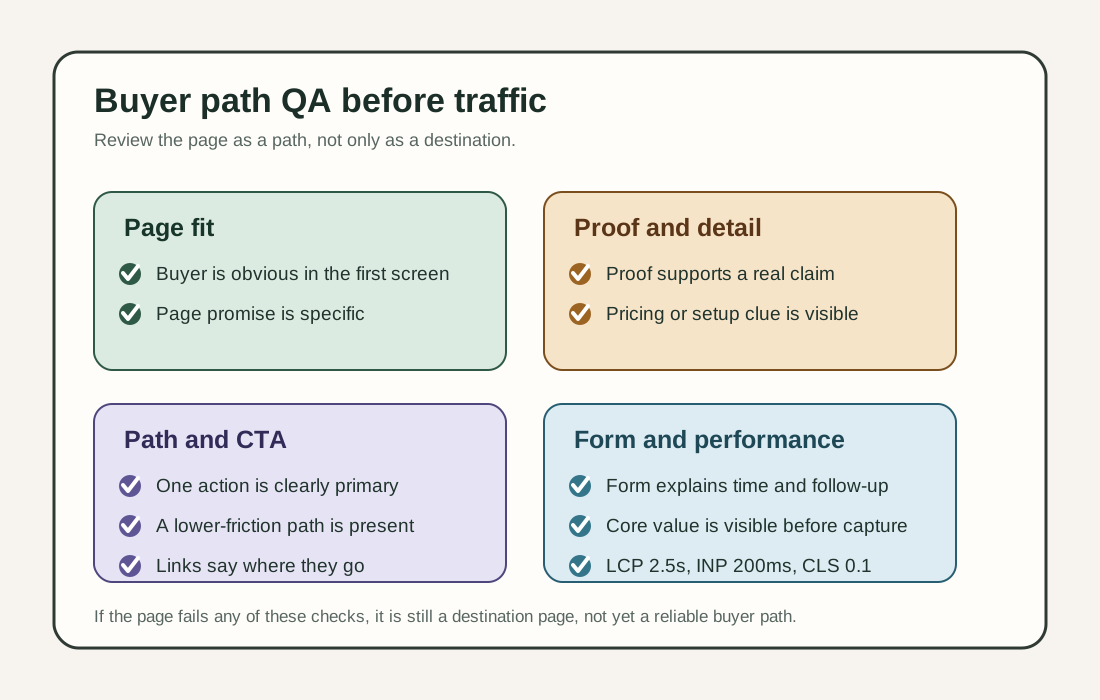
New-page buyer-path checklist
Before sending traffic to a new page, check. For a broader pre-traffic launch pass, read Top 5 Things Every New Landing Page Must Do Before You Send Traffic:
- Can a target buyer tell the page is for them in ten seconds?
- Does the page explain its job, not only the product category?
- Is there enough proof or detail before the primary CTA?
- Does one action clearly have priority?
- Is there a lower-friction path for visitors who are interested but not ready?
- Do internal links point to pricing, proof, setup, security, comparison, or demo expectations with descriptive anchor text?
- Are the core basics visible before any high-commitment form?
- Does the page say what happens after the primary CTA or form?
- On mobile, are the proof block, CTA, and secondary path usable without hunting?
- Do Web Vitals checks show LCP within 2.5 seconds, INP at 200 milliseconds or less, and CLS at 0.1 or less at the 75th percentile across mobile and desktop?
Where TitleFlash fits
TitleFlash is not a CRM, buyer-intent system, popup platform, analytics tool, or personalization engine.
It fits after a page already does the hard work of clarifying fit and the next step. If a visitor reaches a high-intent page, starts evaluating, and then switches away from the tab, a self-contained browser-tab message can offer a respectful reminder to return. That can support pricing, trial, comparison, demo, or resource pages where the reader already had enough context to care.
The boundary matters. TitleFlash does not track customer-site visitors at runtime, score buyers, personalize page content, or depend on a TitleFlash CDN after installation. Use it as a return path, not as a substitute for proof, page structure, pricing context, or transparent forms.
The bottom line
A new page becomes a buyer path when it helps the visitor make the next useful decision.
That usually means showing fit early, adding enough proof to continue, prioritizing the right CTA, linking to the next supporting pages, and using respectful capture only after the page has already delivered value.