B2B buyer attraction
10 Non-Obvious Ways to Attract B2B Buyers to Your Website
Attract better-fit B2B buyers by turning buying triggers, fit filters, proof, risk answers, internal links, and respectful return paths into a website path buyers can actually use.
On this page
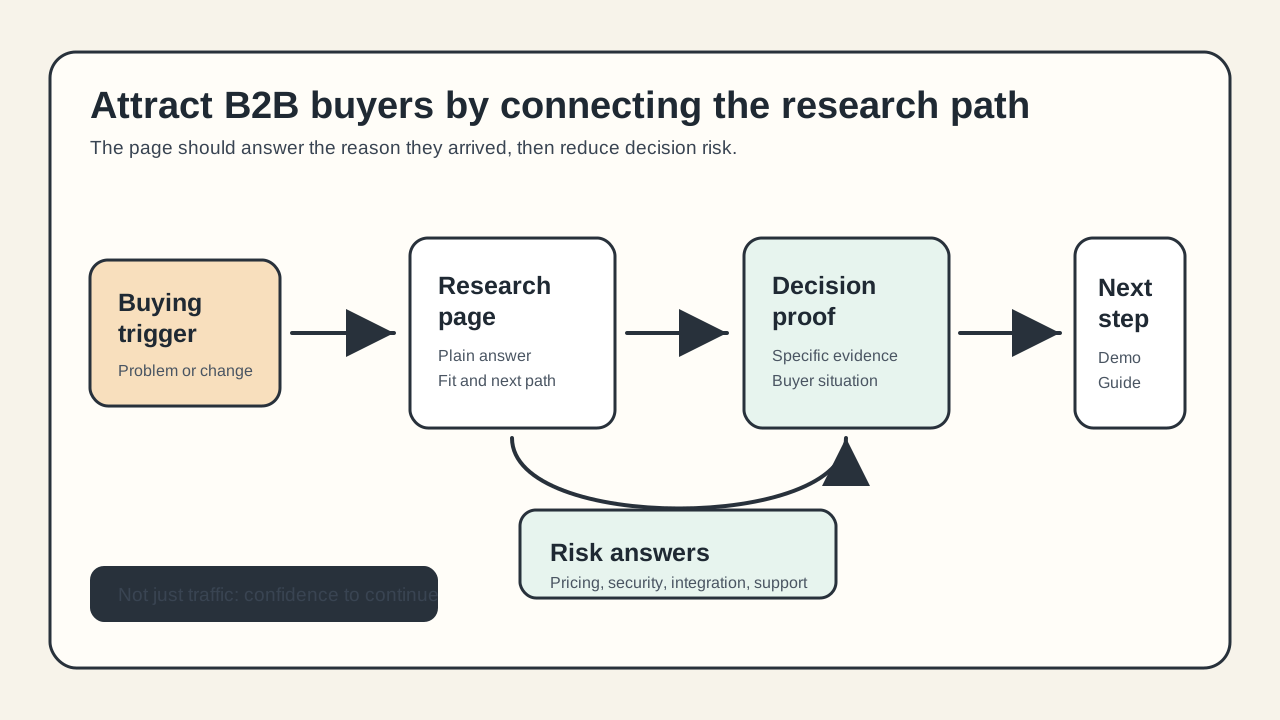
The most useful ways to attract B2B buyers are not always bigger ad budgets, broader keywords, or more gated ebooks. Better-fit buyers usually arrive because the website answers a specific buying trigger, helps them evaluate privately, proves fit for their situation, and gives them a low-friction way to continue.
This guide is for B2B founders, demand marketers, and small teams that want more qualified website demand without turning every page into a sales pitch. The goal is not more anonymous traffic. The goal is to help the right buyer find you, understand whether you fit, trust the evidence, and return when they are ready.
The quick answer
The ten non-obvious ways to attract B2B buyers to your website are:
- Turn buying triggers into pages, not just keywords.
- Add right-fit and poor-fit filters before the form.
- Publish budget and implementation context earlier.
- Write comparison pages around tradeoffs, not takedowns.
- Build proof clusters for specific buyer situations.
- Make technical and risk answers crawlable.
- Ungate the content buyers need for early research.
- Link educational pages into a real buyer path.
- Format visible answer blocks for humans and AI-assisted research.
- Create respectful return paths for buyers who are not ready today.
None of these moves should be treated as a hack. Each one works only when it helps a real buyer answer a real question with less friction.
Why "attract buyers" is different from "get traffic"
A website can attract traffic and still repel buyers. That happens when pages answer the search query but not the buying question, when content hides basic evaluation details behind forms, or when proof is too generic for a serious team to trust.
Current B2B buying research points in the same direction: buyers want more self-directed research, but they still value useful expert help when it is specific to their situation. Gartner reported in 2026 that 67 percent of surveyed B2B buyers preferred a rep-free purchase experience, while its 2025 research also noted that buyers still prefer seller input for contextual tasks such as judging fit for their company.
That creates a practical website standard: the site should let buyers do meaningful work before they book a demo. If your best information only appears after a form or sales call, the page is not attracting buyers. It is attracting uncertainty.
1. Turn buying triggers into pages, not just keywords
Why it matters
Many B2B pages are built around category keywords, but buyers often search from a trigger: a failed workflow, a new compliance need, a manual process that stopped scaling, a team change, a migration, or a missed revenue target.
Those trigger searches can be less obvious than "best [category] software," but they are closer to the buyer's lived problem. Google recommends using the words readers would search for and creating people-first content that provides original value. A trigger page does that better than a thin keyword page because it starts from the buyer's situation.
How to apply it
List the moments that make a buyer start looking:
- "Our response time is too slow."
- "We cannot tell which demo requests are qualified."
- "The spreadsheet process broke."
- "Security review keeps delaying deals."
- "Our landing pages attract the wrong companies."
Turn the strongest triggers into useful pages that explain the problem, who feels it, what to check, what good looks like, and when your product is a fit. Do not create dozens of near-identical pages. Google warns against doorway abuse when pages are made mostly to rank for variations and funnel users to the same destination.
Example or diagnostic
Instead of a page titled "B2B Lead Capture Software," a stronger trigger page could be:
Why demo requests look busy but do not turn into qualified pipeline
That page can diagnose poor-fit traffic, unclear forms, missing routing, weak proof, and sales handoff gaps. It can then point to product pages, lead capture guidance, and a demo path for teams that actually have the problem.
QA check
Before publishing a trigger page, ask:
- Would a buyer recognize their situation in the first screen?
- Does the page teach them how to diagnose the problem?
- Is there enough detail to stand alone without a sales call?
- Is this page meaningfully different from your category page?
If the page is only a keyword swap, do not publish it.
2. Add right-fit and poor-fit filters before the form
Why it matters
Attracting B2B buyers is partly about attracting fewer wrong buyers. A page that persuades everyone creates noisy forms, wasted calls, and distorted campaign learning. For a broader traffic-fit framework, read How to Attract the Right Visitors to Your Website.
Gartner's 2025 buyer research is useful here because it does not say buyers hate sellers. It says buyers avoid sellers when irrelevant outreach is likely, but still prefer seller help when the seller can provide unique guidance. Your website can make that guidance more relevant before the buyer ever fills out a form.
How to apply it
Add fit filters where the buyer is deciding whether to continue:
- Best for: company types, use cases, team maturity, traffic profile, workflow complexity, or budget range.
- Not a fit for: use cases you do not support, company stages you cannot serve well, or buyer goals your product does not solve.
- Talk to us if: situations where a sales conversation genuinely helps, such as migration, compliance, high-volume rollout, or custom evaluation.
Use plain language. Fit filters should not sound like a procurement wall. They should help serious buyers decide whether the next step is worth their time. For the handoff after self-selection, see How to Turn Website Visitors Into Qualified Leads.
Example or diagnostic
On a demo page, add a small "This is usually a fit when..." block:
- You have enough inbound volume that routing quality matters.
- Your team needs to separate qualified demand from low-fit requests.
- Sales needs context before the first reply.
Then add a "Probably not a fit when..." block:
- You only need a basic contact form.
- You do not have a clear follow-up process.
- You are trying to buy traffic rather than improve qualification.
QA check
Ask one person outside the team to read the page and answer:
- Who is this for?
- Who is this not for?
- What kind of buyer should talk to sales?
- What kind of visitor should choose a softer next step?
If they cannot answer, your page is still too broad.
3. Publish budget and implementation context earlier
Why it matters
B2B buyers often need to know whether a solution is financially and operationally plausible before they identify themselves. NN/g B2B website research has repeatedly found that B2B sites frustrate users when they omit key decision information such as cost, implementation, integration, support, training, and outcomes. NN/g pricing guidance also warns that hidden or confusing pricing can create friction and mistrust.
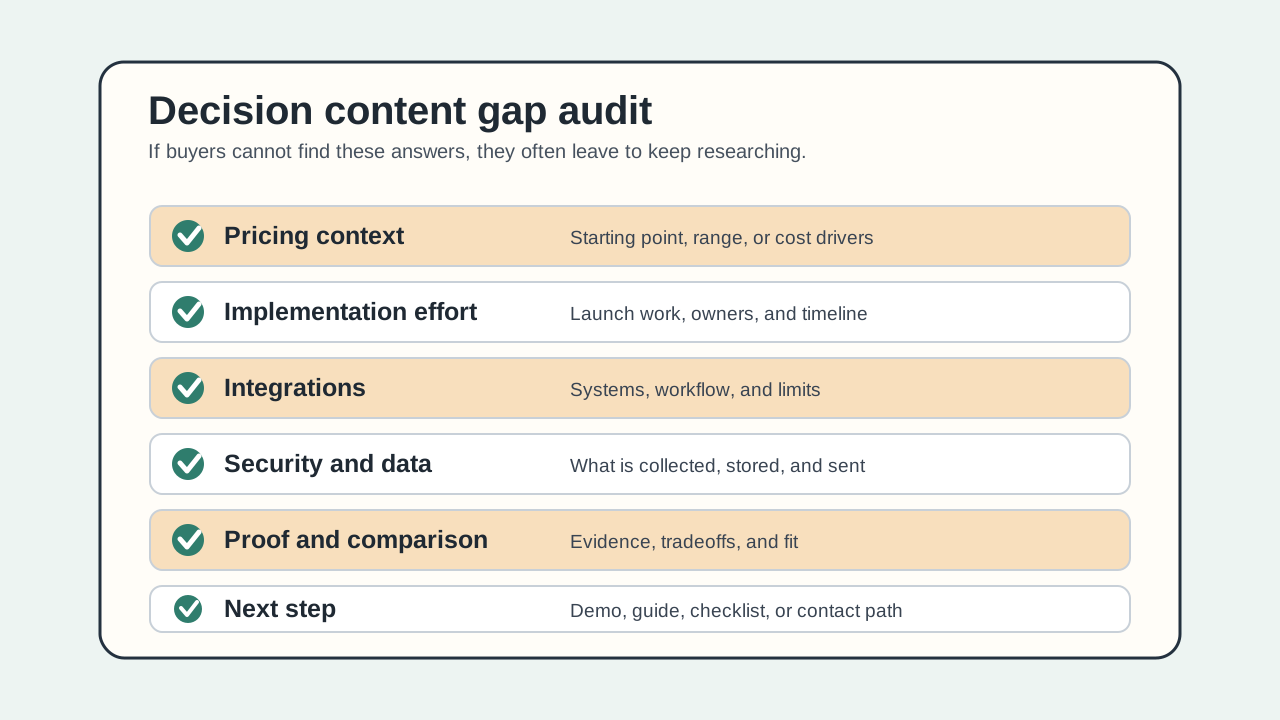
You do not need to publish a perfect quote for every custom deal. You do need to give the buyer enough budget and implementation context to decide whether the conversation is realistic.
How to apply it
Add practical context before the form:
- Pricing model: seat-based, usage-based, annual contract, one-time setup, or plan-based.
- Budget shape: starting price, typical range, "from" price, plan examples, or what drives cost.
- Implementation effort: same-day setup, IT review, migration, integrations, training, or change management.
- Timeline: what a simple launch looks like versus an enterprise rollout.
- Ownership: who needs to be involved from marketing, sales, RevOps, security, or engineering.
If exact pricing is impossible, explain why and show the factors that affect cost. That is still more useful than hiding all pricing behind "Contact sales."
Example or diagnostic
Run a "budget meeting" test. Imagine your buyer has to bring your product to an internal discussion without talking to you yet. Can they explain:
- What it probably costs?
- What work is needed to launch?
- Which systems or teams are involved?
- What risk questions will come up?
- What the first success milestone is?
If not, the page is probably attracting curiosity but losing buyers.
QA check
Before sending traffic to a high-intent page, check whether it answers these seven decision questions:
- What does it cost or what drives cost?
- How long does setup take?
- What systems does it connect to?
- What happens after the form is submitted?
- What proof exists for this buyer's situation?
- What risks should the buyer evaluate?
- What is the next step if they are not ready for sales?
4. Write comparison pages around tradeoffs, not takedowns
Why it matters
Comparison searches are high-intent, but many comparison pages are written as disguised sales pages. Serious buyers can feel that quickly. NN/g's writing guidance warns that promotional writing reduces credibility, and Google's helpful-content guidance asks whether the content provides substantial value compared with other search results.
A good B2B comparison page helps buyers understand tradeoffs. It can still recommend your product when it fits, but it should not pretend every alternative is bad.
How to apply it
Build comparison pages around buyer decisions:
- Best for small teams versus enterprise teams.
- Self-serve setup versus assisted implementation.
- Point solution versus platform.
- Lightweight workflow versus complex automation.
- Privacy-friendly local script versus hosted runtime dependency.
- Low-friction contact path versus deeply qualified demo request.
State the situations where each option makes sense. If you compare against competitors, use verifiable public claims and avoid unsupported feature accusations.
Example or diagnostic
A weak comparison page says:
We are better than every alternative.
A useful comparison page says:
Choose a lightweight self-serve option if you need one focused campaign live today. Choose a broader platform if you need centralized orchestration, analytics, and sales routing across many channels.
That kind of answer attracts buyers who are trying to make a decision, not just click a brand name.
QA check
For each comparison page, ask:
- Does it name when the alternative is a better fit?
- Does it use verifiable facts rather than vague superiority claims?
- Does it help a buyer choose even if they do not choose you?
- Does it link to deeper proof, pricing context, and next-step pages?
If the page would embarrass you in front of a knowledgeable buyer, rewrite it.
5. Build proof clusters for specific buyer situations
Why it matters
Generic proof rarely answers a specific buyer's concern. A logo wall says some companies trusted you. It does not explain whether your product worked for a similar team, use case, risk profile, or rollout.
TrustRadius reported that many buyers look at user reviews and speak with current users before buying. That does not mean your website should give up proof to third-party platforms. It means your proof has to be specific enough to help buyers verify fit.
How to apply it
Group proof around buyer situations:
- Industry: "B2B SaaS teams with high-intent demo pages."
- Role: "Demand generation teams trying to improve qualified inbound."
- Trigger: "Teams replacing manual lead review."
- Risk: "Security-conscious teams that need no customer-site tracking."
- Stage: "Small teams launching before a full RevOps stack."
For each cluster, connect the proof to a claim. For a related page-proof model, see Website Homepage Marketing Best Practices for B2B Teams. If you say setup is fast, show the launch path. If you say it helps qualification, show what the team changed. If you say it is privacy-friendly, explain the runtime model accurately.
Example or diagnostic
Audit a proof section and label each proof point:
- What claim does this support?
- Which buyer situation does it fit?
- What skepticism does it reduce?
- Is it current, specific, and truthful?
If proof cannot be mapped to a buyer question, it is probably decorative.
QA check
Before publishing a proof cluster, verify:
- The customer, quote, metric, or example is real and approved for use.
- The proof does not imply results you cannot support.
- The proof is near the decision it supports.
- The page does not rely only on brand logos.
6. Make technical and risk answers crawlable
Why it matters
B2B buyers often involve more than one person. A marketer may care about pipeline quality, RevOps may care about routing, security may care about data handling, and finance may care about contract shape. If those answers are trapped in PDFs, sales decks, or calls, the website becomes a weak research tool.
NN/g's B2B usability guidance emphasizes the need for clear buying information such as implementation, integration, support, and outcomes. Google also recommends accessible, useful visible content. Technical and risk answers should be findable, linkable, and written in the buyer's language.
How to apply it
Create plain, crawlable pages or sections for:
- Integrations and supported workflows.
- Security, privacy, data handling, and runtime model.
- Migration or setup steps.
- Support and training expectations.
- Known limits and what is out of scope.
- Procurement or legal questions that appear often.
Use simple headings that match buyer questions. Avoid burying every answer in accordion text that is hard to scan or in gated PDFs that cannot help early research.
Example or diagnostic
For TitleFlash, a risk answer should not say:
We optimize visitor engagement with smart tracking.
That would be inaccurate. A better answer is:
The exported TitleFlash script is self-contained. It does not call TitleFlash after installation, does not load a TitleFlash CDN, and does not send visitor analytics back to TitleFlash at runtime.
That answer helps a privacy-conscious buyer evaluate fit without inventing capabilities.
QA check
Search your own site for the terms a buyer would use:
- security
- privacy
- integration
- implementation
- migration
- pricing
- support
- data
- API
- limits
If important answers are missing or only visible after a form, add a crawlable page or section.
7. Ungate the content buyers need for early research
Why it matters
Gates can capture leads, but they can also block buyers who are still trying to learn enough to trust you. NN/g recommends keeping broad awareness and basic product information ungated, while saving gates for content that provides enough value to justify the form.
For B2B websites, this is a buyer-attraction issue. A buyer who cannot access basic evaluation information may return to search, a review platform, a peer, or a competitor.
How to apply it
Ungate information that helps buyers decide whether to keep researching:
- Category explanations.
- Product fit and poor-fit criteria.
- Comparison frameworks.
- Pricing model and budget drivers.
- Implementation overview.
- Security and privacy basics.
- Templates or checklists that teach the buyer how to evaluate the problem.
Gate content only when the exchange is fair, such as a deep benchmark, custom calculator output, detailed assessment, or consultation. For form and next-step design, read B2B Website Lead Capture Best Practices. Even then, set expectations before the form and keep the form short.
Example or diagnostic
If your best answer to "How does this work?" is inside a gated PDF, move the answer onto the page. Keep the PDF as a deeper asset if it adds examples, worksheets, or a buyer-ready internal memo.
QA check
Open your top five acquisition pages in a private browser. Without filling a form, can a buyer understand:
- The problem.
- The solution category.
- Your approach.
- Who it fits.
- What it roughly costs or what affects cost.
- What the next step is.
If not, the gate is probably too early.
8. Link educational pages into a real buyer path
Why it matters
Many B2B sites publish useful articles, but leave them disconnected from the pages where buyers make decisions. Google recommends crawlable links and says every important page should be linked from at least one other page. More importantly, buyers need a route from "I understand the problem" to "I can evaluate this option."
Internal linking is not only an SEO task. It is buyer-path design.
How to apply it
Map each educational page to a natural next page:
- Problem article to diagnostic checklist.
- Diagnostic checklist to solution category page.
- Solution category page to comparison or proof.
- Proof page to pricing, demo, trial, or implementation guide.
- Demo page to softer next steps for buyers who are not ready.
Use descriptive anchor text. "See how qualification works on demo, pricing, and contact pages" is more useful than "Learn more." For action-path details, see Website CTA Best Practices and Top 5 Things Every New Landing Page Must Do Before You Send Traffic.
Example or diagnostic
Pick one blog post that gets organic traffic. Read the end of each major section and ask:
- What question would a serious buyer ask next?
- Is there a relevant page that answers it?
- Is that page linked in context?
If every article ends in the same generic demo CTA, you are probably losing buyers who need one more answer before they act.
QA check
For each important article, add one internal link for each intent level when relevant:
- Understand the problem.
- Compare approaches.
- See proof.
- Check implementation.
- Choose a next step.
Do not force all five into every article. Use the links that match the reader's actual stage.
9. Format visible answer blocks for humans and AI-assisted research
Why it matters
B2B buyers increasingly research with AI tools and search AI features, but the fundamentals still apply. Google says the same Search fundamentals apply to AI features, recommends making text content accessible, and says structured data should match visible content. TrustRadius also reported that many buyers click source links from AI Overview results to verify information.
That means your website needs clear, quotable, visible answers that stand on their own. It does not mean stuffing pages with fake FAQ text or chasing AI-only shortcuts.
How to apply it
For important pages, add visible answer blocks:
- "What this solves."
- "Who this is for."
- "When this is not a fit."
- "How implementation works."
- "What data is collected."
- "How pricing works."
- "What happens after you request a demo."
Keep the answer short, specific, and near the fuller explanation. Use appropriate structured data only when it represents visible page content and follows Google guidance.
Example or diagnostic
Ask an assistant, a teammate, or a new hire to answer this from the page alone:
What does this product do, who is it for, what does it cost, how hard is setup, and what should I do next?
If the answer is vague or wrong, your visible content is not clear enough for human readers or AI-assisted researchers.
QA check
Before publishing, review each answer block:
- Is the answer visible on the page?
- Does it match the deeper page copy?
- Is it specific enough to quote without distortion?
- Does any structured data match the visible content?
- Does the page avoid AI-only hacks or hidden claims?
10. Create respectful return paths for buyers who are not ready today
Why it matters
Many B2B buyers are not ready to book a demo the first time they visit. They may be collecting options, preparing an internal discussion, waiting for budget, checking risk, or comparing stakeholders' needs.
If your only next step is "Book a demo," you may be asking too much too early. A respectful return path keeps the relationship useful without pretending the visitor is ready.
How to apply it
Offer next steps for different readiness levels:
- Saveable checklist or buyer memo.
- Product tour or interactive example.
- Comparison guide.
- Pricing or implementation explainer.
- Newsletter or product update.
- Contact path for a specific question.
- Inactive-tab reminder for visitors who leave mid-evaluation.
This is where TitleFlash can fit as a small layer, not the main attraction engine. If a buyer leaves a page during evaluation, a self-contained tab-title message can remind them what they were reviewing. It should be clear, respectful, and relevant, such as:
- "Still comparing B2B lead paths?"
- "Your demo-page checklist is open"
- "Need the implementation notes?"
Do not use tab messages to fake urgency, pressure buyers, or imply tracking. TitleFlash exports a self-contained script. It does not call TitleFlash at runtime, load a TitleFlash CDN, or send visitor analytics back to TitleFlash.
Example or diagnostic
On a comparison page, use three next steps:
- Ready to evaluate: "Book a fit call."
- Still researching: "Read the implementation guide."
- Need to share internally: "Copy the buyer checklist."
Then use a short inactive-tab title only as a reminder for the page they already opened.
QA check
Review every high-intent page and ask:
- Is there a useful next step for buyers who are not ready for sales?
- Is the softer path genuinely useful, not a delay tactic?
- Does any reminder message match the page the visitor opened?
- Does the page avoid fake urgency, hidden tracking, and misleading personalization?
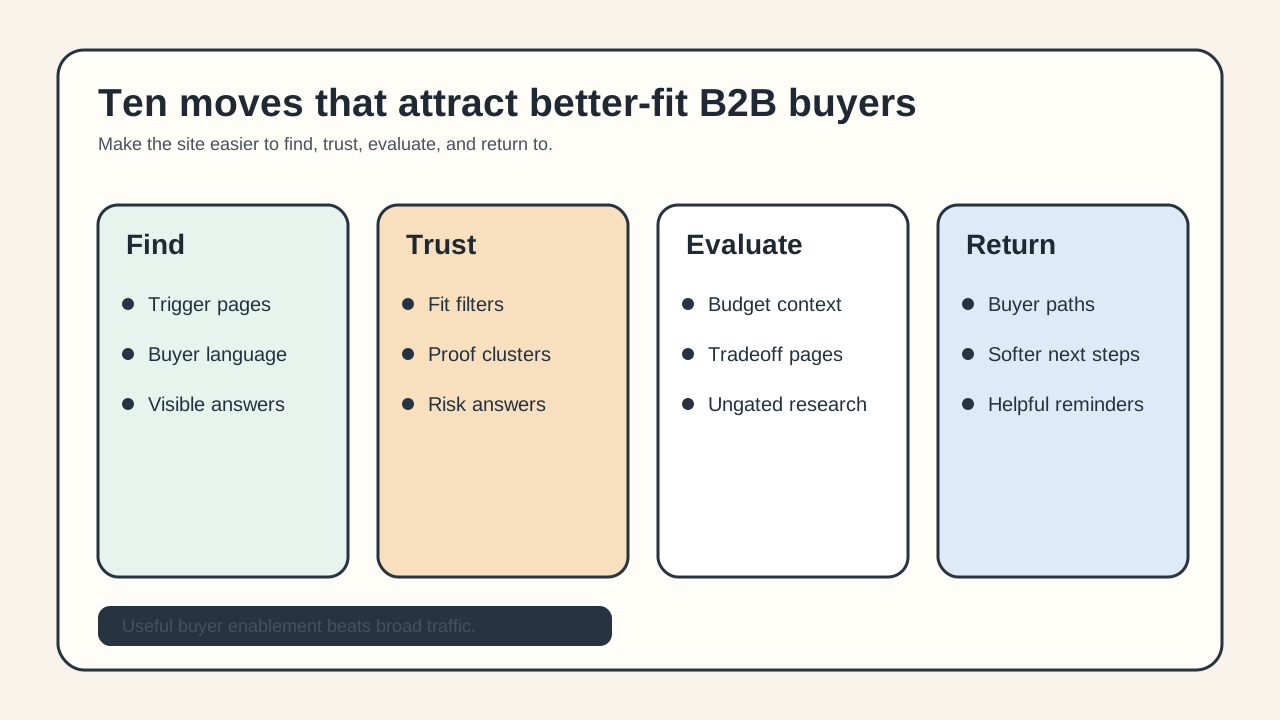
A simple B2B buyer-attraction audit
Use this checklist before you start a new campaign or content push:
- Trigger pages: Do we have pages for the moments that make buyers start looking?
- Fit filters: Can buyers see who we are best for and not best for?
- Budget context: Can buyers estimate whether a conversation is realistic?
- Comparison help: Do we explain tradeoffs fairly?
- Proof clusters: Does proof map to real buyer situations?
- Risk answers: Can security, integration, implementation, support, and data questions be found without a form?
- Ungated research: Can early-stage buyers learn enough before identifying themselves?
- Buyer paths: Do educational pages link to the next useful decision page?
- Answer blocks: Can humans and AI-assisted researchers extract accurate answers from visible text?
- Return paths: Do not-ready buyers have a respectful way to continue later?
What to avoid
Avoid tactics that attract clicks but weaken trust:
- Thin role or industry pages that only swap keywords.
- Comparison pages that hide tradeoffs.
- Gated basic product information.
- Proof sections with vague logos and no claim support.
- AI-search tricks that do not improve visible content.
- Pricing pages that create more questions than they answer.
- Demo CTAs that ignore buyers who are still researching.
- Retargeting or tab messages that pressure visitors instead of helping them return.
Good B2B website attraction is less about louder promotion and more about useful buyer enablement. The right buyer should be able to find the page, recognize the problem, judge fit, verify trust, and choose a next step without having to decode your funnel.
SEO and AEO checks for B2B buyer-attraction pages
Search engines and AI-assisted research tools can only work with the useful content you make visible. For this article and for your own B2B buyer-attraction pages:
- Put the direct answer near the top in crawlable HTML.
- Use headings that match buyer questions, not only internal product categories.
- Link educational pages into comparison, proof, pricing, implementation, and next-step pages with descriptive anchor text.
- Cite current sources when you use research-backed buyer behavior claims.
- Keep structured data aligned with visible page content.
- Keep images useful, with alt text that describes the diagram or checklist.
- Avoid AI-search tricks, hidden claims, doorway pages, and unsupported conversion promises.
Where TitleFlash fits
TitleFlash is not a traffic-generation platform, ABM tool, analytics product, CRM, lead-scoring system, chatbot, popup tool, or buyer-identification product. It should not be used to compensate for missing buyer answers, weak proof, unclear pricing context, or poor page fit.
TitleFlash fits as a respectful return-path layer after the buyer page is already useful. If a visitor opens a pricing page, comparison guide, demo page, buyer checklist, implementation explainer, or support article and then switches tabs, a short inactive-tab title can remind them what they were reviewing.
The exported TitleFlash script is self-contained. It does not call TitleFlash after installation, does not load a TitleFlash CDN, does not track visitors, does not score buyers, and does not send customer-site visitor analytics back to TitleFlash at runtime.
Build a respectful return-path reminder.
Draft the inactive-tab title, preview the moment, and export a self-contained script when your B2B buyer page already deserves the return visit.
Build a tab-title flow free