Landing page diagnosis
Top 5 Landing Page Mistakes That Quietly Lose Qualified Visitors
Find the quiet landing-page leaks that make serious B2B visitors lose confidence before they take a qualified next step.
On this page
Some landing pages fail loudly. The headline is confusing, the form breaks, the page loads slowly, or the offer is clearly not relevant.
The harder problem is quieter: qualified visitors arrive, recognize part of the offer, keep reading for a moment, then leave because the page does not answer the next decision they need to make.
That matters for B2B pages because serious buyers are not only looking for a button. Gartner's 2026 buyer research points to more self-directed and digitally mediated buying, while Forrester's 2024 business buying research describes stalled purchases, dissatisfied buyers, and buying groups that need better support.
So the page does not only need to get attention. It needs to help the right visitor keep evaluating.
The quick answer
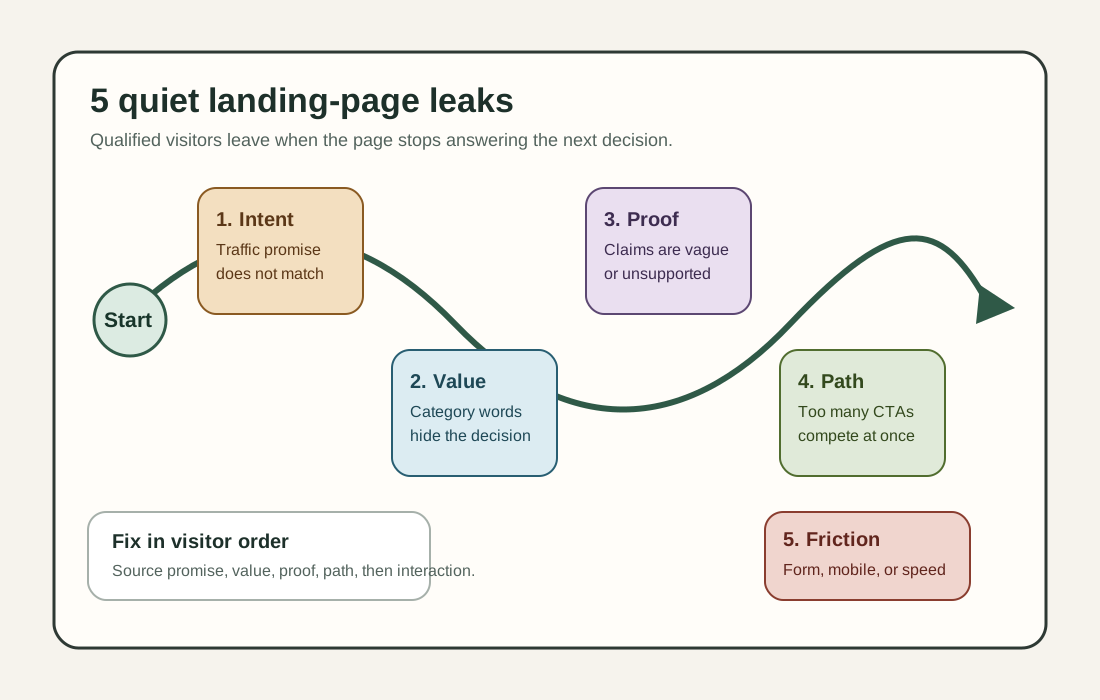
The five landing page mistakes that quietly lose qualified visitors are:
- The page does not match the traffic promise fast enough.
- The page describes the category but not the buyer's decision.
- The proof is vague, hidden, or unsupported.
- The next step competes with too many other options.
- The page adds friction exactly when interest is real.
These mistakes are quiet because they can leave the page looking "fine." The page may have a clean design, a visible CTA, and enough copy to feel complete. But from the visitor's point of view, the page has not answered: "Is this for me, can I trust it, and what should I do next?"
Why qualified visitors leave quietly
A qualified visitor is not always ready to book a demo in the first minute.
They may be comparing options, checking fit for a team, validating a claim, forwarding the page to someone else, or trying to decide whether the next step is worth the interruption. A page can lose that visitor without looking broken if it makes one of those tasks harder.
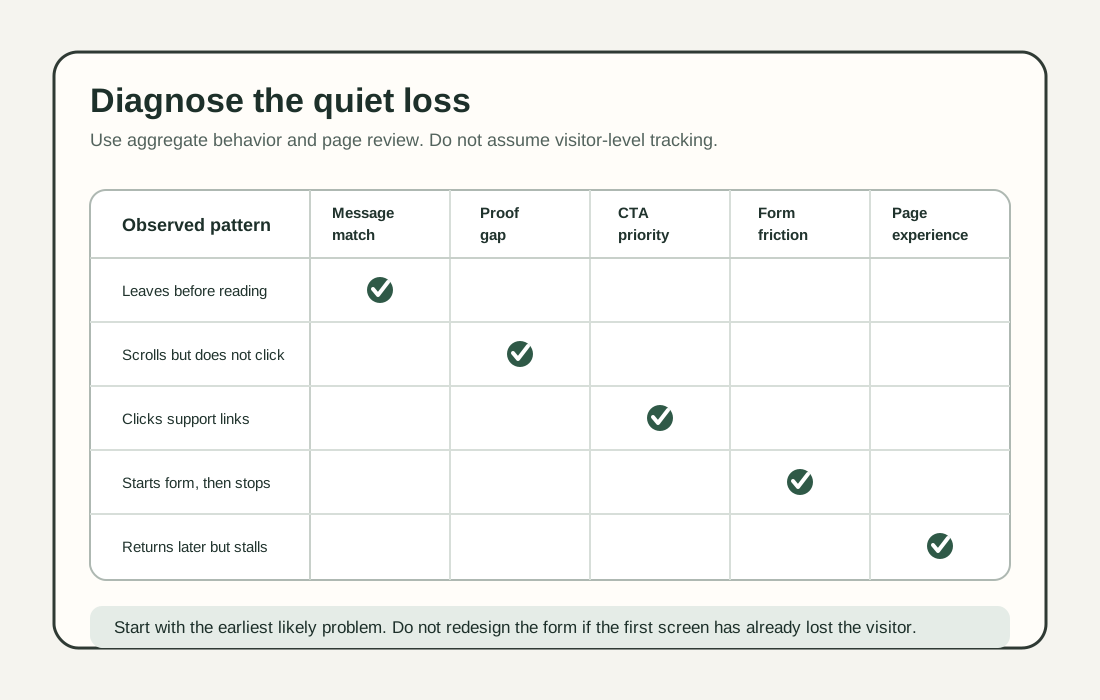
The simplest diagnostic is this:
- If the visitor cannot recognize fit, the first screen is the problem.
- If the visitor recognizes fit but still cannot judge value, the proof is the problem.
- If the visitor believes the value but cannot choose the next step, the path is the problem.
- If the visitor chooses the next step but stops at a form or mobile friction, the interaction is the problem.
1. The page does not match the traffic promise fast enough
Why it matters
The visitor arrives with context. They clicked an ad, a search result, a social post, an email link, a partner link, or an internal link. If the first screen does not confirm that context, the page creates doubt before it creates interest.
Google Ads guidance says people expect the landing page to be relevant to what they clicked and are more likely to leave when they do not immediately find what they expected. Google's landing-page navigation update makes the same practical point: pages should be relevant and easy to navigate.
Qualified visitors leave when they have to translate the page back into the promise that brought them there.
How to apply it
Audit the page by traffic source:
- Search query or keyword.
- Ad headline or email subject.
- Social post or partner referral.
- Internal link label.
- Sales follow-up link.
Then make the first screen confirm the same promise in plain language. For the broader pre-traffic version of this check, read Top 5 Things Every New Landing Page Must Do Before You Send Traffic.
You do not need to repeat the ad word for word. You do need to preserve the same buyer, offer, and next-step expectation.
Example or diagnostic
Traffic promise:
"Compare demo-ready lead capture options for B2B SaaS."
Weak first screen:
"Grow faster with modern customer engagement."
Stronger first screen:
"Compare lead capture paths for B2B SaaS teams before you ask for a demo."
Diagnostic: put the traffic promise and first-screen headline side by side. If a reader cannot tell they are part of the same journey, the page is leaking qualified visitors before the body copy has a chance.
QA check
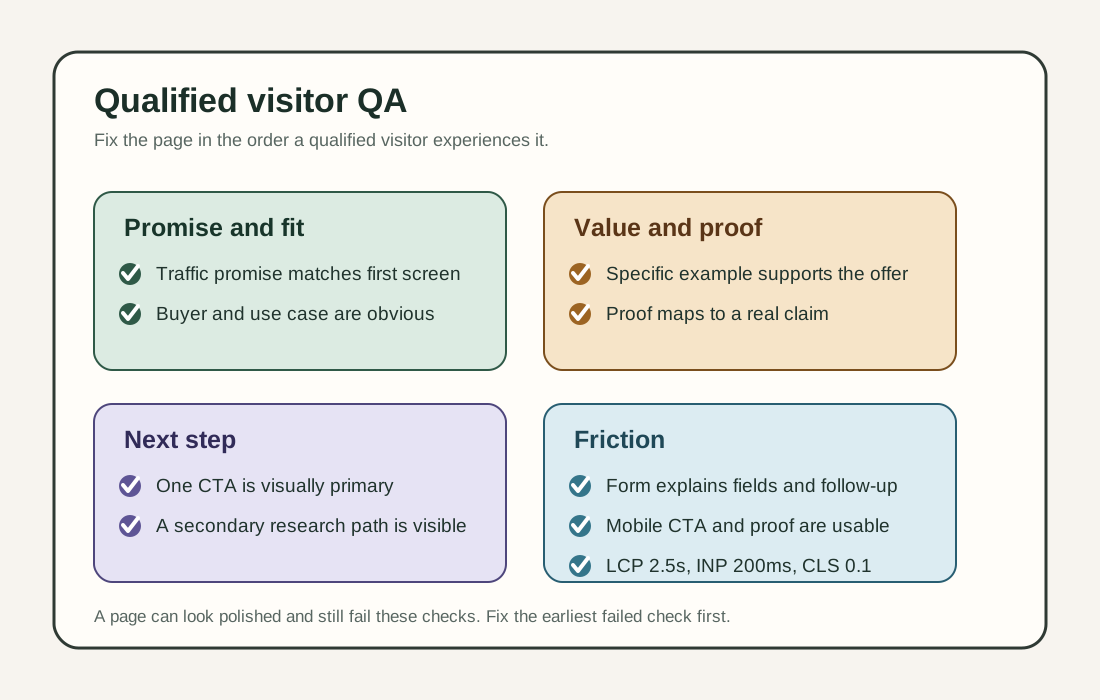
Before sending traffic, confirm:
- The first screen names the same audience as the traffic source.
- The offer or page job matches what the visitor clicked.
- The primary CTA does not ask for a different commitment than the source promised.
- The mobile first screen still shows enough context to confirm fit.
2. The page describes the category but not the buyer's decision
Why it matters
Many landing pages sound polished but do not help the visitor decide.
They explain the product category, use broad value claims, and repeat words that could fit almost any competitor. That is a problem because serious visitors need decision help, not only category education.
Google Search Central's people-first content guidance asks whether content provides original information, comprehensive coverage, helpful analysis, and substantial value. NN/g homepage guidance also recommends using specific examples of offerings instead of only broad labels.
The landing page version of this mistake is simple: the page says what category it belongs to, but not why this visitor should keep evaluating this specific offer. For first-screen structure, pair this with Best 5 Above-the-Fold Fixes for B2B Landing Pages.
How to apply it
Replace broad category language with decision-useful detail:
- Who the page is best for.
- What situation or trigger makes the offer relevant now.
- What the visitor can compare or decide after reading.
- Which outcomes are realistic.
- Which use cases are a poor fit.
Add one concrete example near the top. It can be a workflow, mini teardown, short use case, pricing scenario, setup note, or before-and-after copy comparison.
Example or diagnostic
Weak copy:
"A powerful platform to improve your customer journey."
Stronger copy:
"For B2B teams that already send traffic to demo, pricing, or feature pages but need a lighter way to bring distracted visitors back without adding popups."
Diagnostic: highlight every sentence that helps the visitor decide if the page is for them. If most highlighted sentences are generic value words, the page is not specific enough.
QA check
Before publishing, confirm:
- The page names a real use case, not only a product category.
- The reader can identify whether they are a good fit.
- At least one example makes the value concrete.
- The page says who should not use the offer, or when another path is better.
4. The next step competes with too many other options
Why it matters
A qualified visitor can believe the page and still leave if the next step is unclear.
This often happens when the page gives equal visual weight to too many actions: book a demo, start free, contact sales, read the blog, view pricing, download the guide, watch the video, and subscribe. None of those actions is wrong by itself. The mistake is making the visitor choose the page strategy.
NN/g homepage guidance says clear, descriptive link labels and calls to action should match user goals, and that if everything is emphasized, nothing stands out. Google Ads landing-page guidance also recommends making it quick and easy for customers to perform the desired action.
How to apply it
Choose one primary next step for the page. If CTA wording or placement is the weak point, use Website CTA Best Practices as the deeper companion guide.
Then choose one lower-friction path for visitors who are interested but not ready for the primary action.
Examples:
- Primary: "See pricing and plan fit"
- Secondary: "Read the setup checklist"
- Primary: "Book a 20-minute demo"
- Secondary: "Compare demo-readiness questions"
- Primary: "Start building a tab-title flow"
- Secondary: "See install options"
Make the primary action visually strongest. Make the secondary path visible but quieter. Use descriptive labels so the visitor knows what happens next.
Example or diagnostic
Weak next-step set:
"Get started" / "Learn more" / "Talk to us" / "Explore" / "Resources"
Stronger next-step set:
Primary: "Build a tab-title flow free"
Secondary: "Read the install checklist"
Diagnostic: blur the page or view it at 25 percent zoom. If more than one action looks equally important, the page is making the visitor do prioritization work.
QA check
Before publishing, confirm:
- One action is clearly primary.
- One lower-friction path exists for research-mode visitors.
- CTA labels say what happens after the click.
- Supporting links use descriptive anchor text, not only "learn more."
5. The page adds friction exactly when interest is real
Why it matters
The worst friction often appears after the visitor has shown interest.
They click the form and see too many fields. They try the page on mobile and the CTA is hard to tap. They scroll back for proof and the page jumps. They need pricing context but hit a gate. They switch tabs to compare options and forget to return.
Each friction point may look small in isolation. Together, they make a serious visitor feel that the page is harder to evaluate than the offer is worth.
NN/g form guidance recommends keeping forms short, grouping related fields, using logical sequencing, and avoiding placeholder text as the only label. Its newer form cognitive-load guidance explains that every form field asks the user to interpret, recall, decide, and enter information. NN/g gating guidance also says early-stage buyers need to understand what the product does and how it benefits them before basic value is gated.
Page performance belongs in the same review. web.dev Web Vitals uses LCP, INP, and CLS to measure loading performance, interactivity, and visual stability, with current good thresholds of LCP within 2.5 seconds, INP at 200 milliseconds or less, and CLS at 0.1 or less at the 75th percentile across mobile and desktop.
How to apply it
Review the page at the exact moment the visitor shows intent. For page-specific form and capture work, see B2B Website Lead Capture Best Practices for Demo, Pricing, and Contact Pages:
- When they click the primary CTA.
- When they open a form.
- When they scroll to proof.
- When they switch to mobile.
- When they return after comparing another page.
Reduce friction where it blocks evaluation:
- Ask only for fields you need now.
- Explain form time, required fields, and follow-up.
- Keep core product, proof, and pricing context visible before a gate.
- Make mobile CTA and form controls easy to tap.
- Check Core Web Vitals and fix slow, unstable, or unresponsive experiences.
- Use respectful return paths only after the page has already delivered value.
For TitleFlash, a return path can be a browser-tab title reminder on high-intent pages where a visitor might switch away while comparing options. It should support the page, not compensate for missing proof, broken forms, or weak mobile experience.
Example or diagnostic
Poor pattern:
The page gives a vague promise, hides the comparison guide behind a long form, gives no follow-up expectation, and shifts layout when the form loads.
Stronger pattern:
The page explains fit and proof first, offers a short form only for a high-intent action, says what happens after submission, and keeps the secondary research path open.
Diagnostic: complete the primary CTA path on a phone using only one thumb. If the form, tap targets, page shifts, or follow-up expectations create doubt, fix that before buying more traffic.
QA check
Before publishing, confirm:
- Core value is visible before high-commitment capture.
- The form asks only for information needed now.
- Required fields, time expectation, and follow-up are clear.
- The mobile CTA, form, and proof blocks are usable.
- LCP, INP, and CLS meet current good thresholds at the 75th percentile, or the draft has a concrete performance fix list.
A 15-minute quiet-loss audit
Use this audit before changing the whole page. If the page also needs stronger path design after the first fix, read Five Best Ways to Turn a New Web Page Into a Buyer Path.
- Pick one traffic source.
- Write the promise from that source in one sentence.
- Compare it with the first screen.
- Highlight the sentences that help a qualified visitor decide.
- Circle every proof element and connect it to the claim it supports.
- Count visually dominant CTAs.
- Complete the primary action on mobile.
- Check the form for unnecessary fields and unclear expectations.
- Check Web Vitals for loading, interactivity, and layout stability.
- Decide which one mistake is most likely losing qualified visitors first.
Do not fix five things at once if the page has one obvious leak. Start with the earliest point where the visitor loses confidence.
A simple priority order
Fix mistakes in the order a visitor experiences them:
- Traffic promise and first-screen fit.
- Concrete value and buyer decision support.
- Credible proof for the main claim.
- CTA priority and supporting paths.
- Form, mobile, performance, and return-path friction.
This order prevents a common waste of effort: optimizing the form before the page has earned the form, or polishing proof blocks before the first screen confirms the right visitor is in the right place.
Where TitleFlash fits
TitleFlash is not a landing-page analytics tool, personalization platform, CRM, popup platform, buyer-intent engine, or conversion-rate optimizer.
It fits after the page has already done the important work: matching the visitor's intent, explaining the offer, supporting the claim, and giving a clear next step. If a qualified visitor switches away from a pricing, demo, comparison, checkout, or setup page, a self-contained browser-tab title message can give them a respectful reason to return.
The boundary matters. TitleFlash does not track customer-site visitors at runtime, score buyers, personalize page content, or depend on a TitleFlash CDN after installation. Use it as one return path for interested visitors, not as a substitute for page clarity, proof, form usability, or performance.
The bottom line
Qualified visitors usually leave for practical reasons.
They cannot confirm the page is for them. They cannot find enough detail to keep evaluating. They do not trust the proof. They do not know which next step matters. Or the page makes the next action harder than it needs to be.
Fix those quiet losses before sending more traffic. For a broader page-first friction pass, see How to Reduce Bounce Rate Without Adding More Popups. A clearer landing page will not force unqualified visitors to convert, but it can help serious visitors keep moving.